
Secrets Management in DevOps — From .env Files to Enterprise-Grade Control

Secrets Management in DevOps: From .env Files to Enterprise-Grade Control

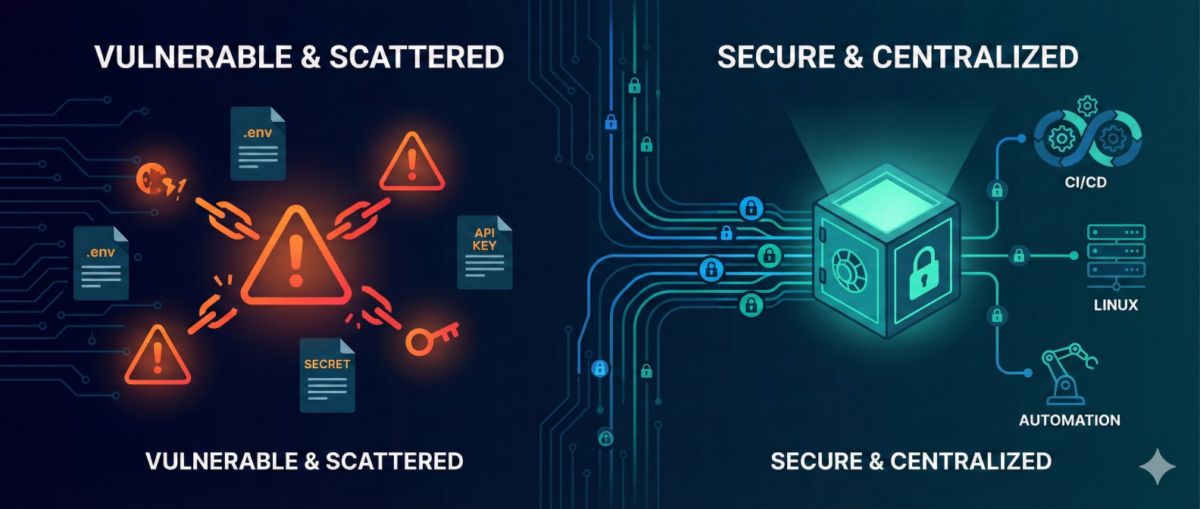
API keys. Database passwords. SSH private keys. OAuth tokens.
Secrets are everywhere in modern infrastructure—and they are one of the most common breach vectors.

In many environments, secrets still live in:

  • .env files

  • CI/CD variables

  • shared password managers

  • copied Slack messages

  • or worse… Git repositories

As infrastructure scales, this approach becomes dangerous.

This guide explains how to evolve from ad-hoc secret handling to structured, auditable, and secure secrets management—without breaking pipelines or slowing teams down.


Why Secrets Become a Hidden Risk

1) Secrets Spread Faster Than Code

Developers copy:

  • .env files between machines

  • API tokens into scripts

  • credentials into automation workflows

Soon, you lose track of:

  • where secrets are stored

  • who has access

  • which ones are still valid


2) Long-Lived Credentials = Long-Term Risk

Static secrets:

  • rarely rotated

  • shared across environments

  • reused in multiple systems

If leaked once, they remain valid until manually revoked.


3) Automation Amplifies Exposure

CI/CD pipelines, infrastructure-as-code, and workflow tools (like n8n) increase the number of systems that require credentials.

More automation = more secret sprawl if unmanaged.


The Principles of Modern Secrets Management

A mature approach is based on five principles:

1) Centralization

Secrets must live in a centralized secret store, not:

  • Git

  • local files

  • environment variables scattered across hosts

Centralization provides:

  • single control point

  • audit logs

  • policy enforcement


2) Least Privilege Access

Each system or service should only access:

  • the specific secret it needs

  • for the minimum duration required

Not:

  • “full access to all secrets in prod”


3) Short-Lived Credentials

Instead of static credentials:

  • use dynamic, time-limited secrets

  • generate database credentials on demand

  • issue temporary cloud tokens

If compromised, the blast radius is limited.


4) Automatic Rotation

Rotation should be:

  • scheduled

  • automated

  • transparent to applications

Manual rotation does not scale.


5) Full Auditability

You should be able to answer:

  • Who accessed which secret?

  • From which system?

  • At what time?

  • For what purpose?

If you can’t answer this, you have governance gaps.


Practical Architecture for DevOps Teams

You don’t need a massive transformation to improve security.

Phase 1: Remove Secrets from Git

  • Scan repositories for leaked credentials

  • Revoke exposed secrets immediately

  • Replace with environment injection from a secure store

This is the fastest risk reduction step.


Phase 2: Introduce a Central Secret Store

Adopt:

  • Vault-style systems

  • Cloud-native secret managers

  • Encrypted secret backends integrated with CI/CD

All pipelines should fetch secrets at runtime—not store them permanently.


Phase 3: Implement Dynamic Secrets for High-Risk Systems

Especially for:

  • databases

  • cloud IAM roles

  • production SSH access

  • automation service accounts

Dynamic credentials dramatically reduce breach impact.


Phase 4: Secure Automation Platforms (Including n8n)

Automation tools often become secret hubs.

Best practices:

  • store credentials in encrypted backend

  • restrict workflow-level access

  • separate dev/stage/prod secrets

  • audit workflow changes

  • restrict export permissions

Automation must not become a secret leakage vector.


Common Anti-Patterns

“Base64 encoding is enough.”

It is not encryption.


“Only Dev has access, so it’s safe.”

Internal threats and compromised laptops are real risks.


“We rotate once per year.”

In modern threat models, that is effectively static.


Incident Reality: Secrets Leak

When—not if—a secret leaks:

  1. You must detect it quickly.

  2. You must rotate immediately.

  3. You must understand blast radius.

  4. You must audit historical usage.

Without centralized management, this becomes chaos.

With structured secrets management, it becomes a controlled response.


Conclusion

DevOps accelerates delivery—but unmanaged secrets accelerate breaches.

Mature secrets management enables:

  • safer automation

  • reduced blast radius

  • audit-ready infrastructure

  • stronger Zero Trust posture

You don’t need perfection to start.
You need centralization, rotation, and visibility.

From .env files to enterprise-grade control—this is one of the highest ROI security upgrades any infrastructure team can implement.
Zero Trust SSH: Hardening Linux Access Without Breaking Operations

Zero Trust SSH: Hardening Linux Access Without Breaking Operations

SSH is still the backbone of Linux operations—incident response, patching, break-glass access, automation, and day-to-day administration. But in many environments, SSH access is treated as a binary switch: either “you can log in” or “you can’t.” That model doesn’t scale in modern organizations where identities change, devices roam, and the blast radius of compromised credentials is massive.

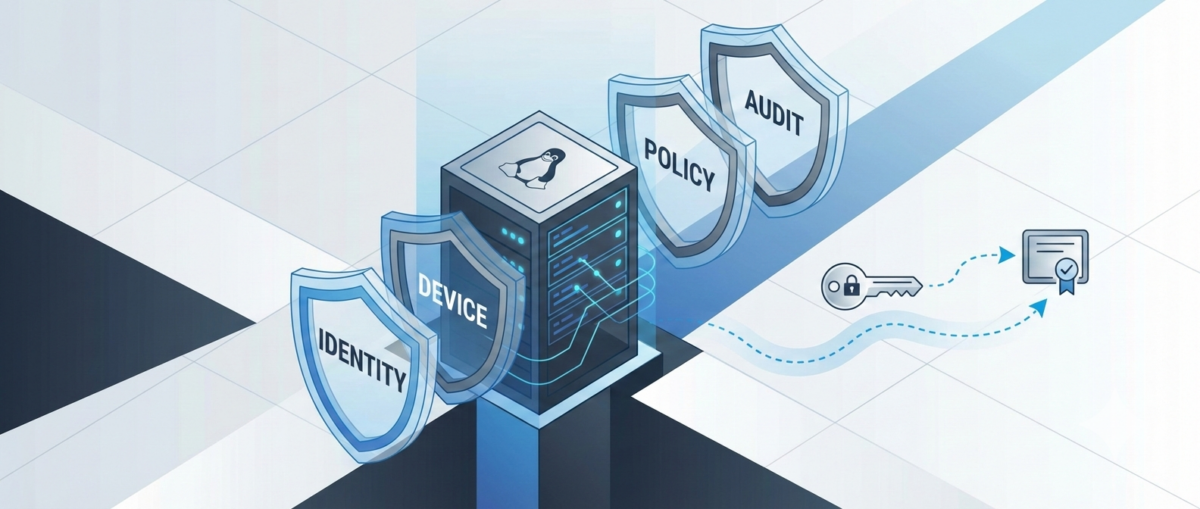
A “Zero Trust” approach to SSH doesn’t mean you stop using SSH. It means you stop trusting networks, long-lived keys, and static access by default—and start validating identity, device posture, intent, and session context every time.

This guide shows a practical hardening path you can roll out incrementally—without crippling your on-call team or breaking automation.


What “Zero Trust” Means for SSH

In practice, Zero Trust SSH is built on four principles:

1) Strong identity over static credentials

Prefer short-lived credentials tied to a real identity and centralized policy.

2) Least privilege by default

Access is constrained to the minimum commands, hosts, time windows, and environments.

3) Continuous verification

Authentication is necessary, but not sufficient—authorization, posture, and session behavior matter too.

4) Auditability and revocability

You should be able to answer: Who accessed what, when, why, from where, using which device—and what did they do? And you should be able to revoke access instantly.


Baseline Hardening in sshd_config (Low-Risk, High-Impact)

Start by making SSH safer without changing workflows.

Disable password auth (or phase it out)

Passwords are phishable and reused.

  • Target state: PasswordAuthentication no

  • Transition: restrict password auth to a bastion or limited group temporarily.

Disallow root SSH login

Require named accounts + privilege escalation.

  • PermitRootLogin no

Reduce attack surface

  • AllowUsers / AllowGroups to explicitly constrain who can log in

  • MaxAuthTries 3

  • LoginGraceTime 30

  • X11Forwarding no (unless truly needed)

  • AllowTcpForwarding no (enable only for specific roles)

  • PermitTunnel no (unless required)

Use modern cryptography

If you maintain older systems, align carefully, but aim for modern KEX/ciphers/MACs and disable legacy algorithms.


Key Management: Stop Treating Keys as Forever Credentials

Traditional SSH keys tend to live for years, get copied between laptops, and are rarely rotated. That’s the opposite of Zero Trust.

Use short-lived SSH certificates (preferred)

Instead of distributing public keys everywhere, you issue SSH certificates that expire (e.g., 8 hours).

  • Central authority signs user keys.

  • Servers trust the CA.

  • Revocation becomes manageable (short TTL + CA policy).

Operational win: You don’t have to chase keys on every server. You control access centrally.

If you must use authorized_keys, lock them down

At minimum:

  • Enforce key rotation (e.g., quarterly)

  • Ban shared keys

  • Ban copying prod keys to personal devices

  • Add from= restrictions when feasible

  • Use separate keys per environment (dev/stage/prod)


Identity-Aware Access: Tie SSH to Your SSO and MFA

SSH should not be the last holdout that bypasses MFA.

Options to achieve MFA + centralized policy

  • Identity-aware proxies / gateways for SSH

  • SSO-integrated access platforms

  • PAM modules and centralized authentication stacks

Goal: When a user leaves the company, access is gone instantly. No lingering keys.


Device Posture: Not All Laptops Are Equal

Zero Trust assumes compromise is possible—so you validate the client, not just the user.

Practical posture checks for SSH access

  • Corporate-managed device requirement for prod

  • Disk encryption enabled

  • EDR running

  • OS patch level within policy

  • MDM compliance state

Even if your SSH stack can’t enforce posture natively, you can enforce it at the access gateway/bastion layer.


Authorization: Don’t Grant Shell When You Only Need a Command

Many operational tasks don’t require full shell access.

Use role-based access patterns

  • Prod read-only role for logs/metrics checks

  • Deployment role limited to CI/CD runners or restricted commands

  • Break-glass role time-bound and heavily audited

Command restriction patterns

  • sudo with tight sudoers rules

  • ForceCommand for narrow workflows

  • Separate service accounts for automation with scoped permissions

Result: even if a credential leaks, the attacker doesn’t get free roam.


Session Controls: Recording, Auditing, and Alerting

Hardening isn’t only about preventing access—it’s also about detecting misuse.

Minimum viable auditability

  • Centralize SSH logs (auth + command where possible)

  • Forward to SIEM

  • Alert on:

    • new source IP / geo anomaly

    • unusual login times

    • first-time access to sensitive hosts

    • repeated failed logins / brute patterns

Session recording (for sensitive environments)

For prod and privileged roles, session recording can be a game-changer—especially in regulated environments.


Automation & CI/CD: Secure SSH Without Breaking Pipelines

Automation is often the reason teams avoid tightening SSH. The key is to treat automation identities properly.

Use distinct machine identities

  • Separate credentials per pipeline / per environment

  • Don’t reuse human keys for automation

Prefer ephemeral credentials for runners

  • Short-lived certs or tokens for CI jobs

  • Rotate secrets automatically

  • Restrict what the runner identity can do (commands/hosts/network)

Add guardrails

  • Only allow automation access from known runner networks

  • Require code review for changes affecting prod access workflows

  • Alert on automation identity used outside pipeline windows


A Rollout Plan That Won’t Cause Pager Fatigue

Phase 1: Baseline hardening (1–2 weeks)

  • Root login off

  • Passwords phased down

  • AllowGroups / allowlists

  • Logging centralized

Phase 2: Centralize identity and MFA (2–6 weeks)

  • SSO integration or gateway

  • Remove shared keys

  • Define roles (read-only / deploy / break-glass)

Phase 3: Ephemeral access + posture (1–3 months)

  • SSH certs with short TTL

  • Device compliance enforcement for prod

  • Session recording for privileged access

Phase 4: Continuous improvement

  • Access reviews

  • Automated key/credential lifecycle

  • Better detections and response playbooks


Common Pitfalls to Avoid

“We’ll just block SSH from the internet”

Good start, but not Zero Trust. Internal networks can be compromised.

“We’ll enforce MFA but keep permanent keys”

MFA helps at login time; permanent keys can still leak and live forever.

“We’ll lock it down later”

SSH is one of the highest-impact attack paths. Hardening is one of the best ROI security projects you can do.


Conclusion

Zero Trust SSH is not one product or one config. It’s a practical shift:

  • from static keys to short-lived credentials,

  • from network trust to identity + device trust,

  • from broad shell access to least privilege,

  • from “hope nothing happens” to auditable, revocable access.

You can start today with baseline sshd hardening and a clear rollout plan—then move to centralized identity, ephemeral access, and posture enforcement without disrupting operations.