
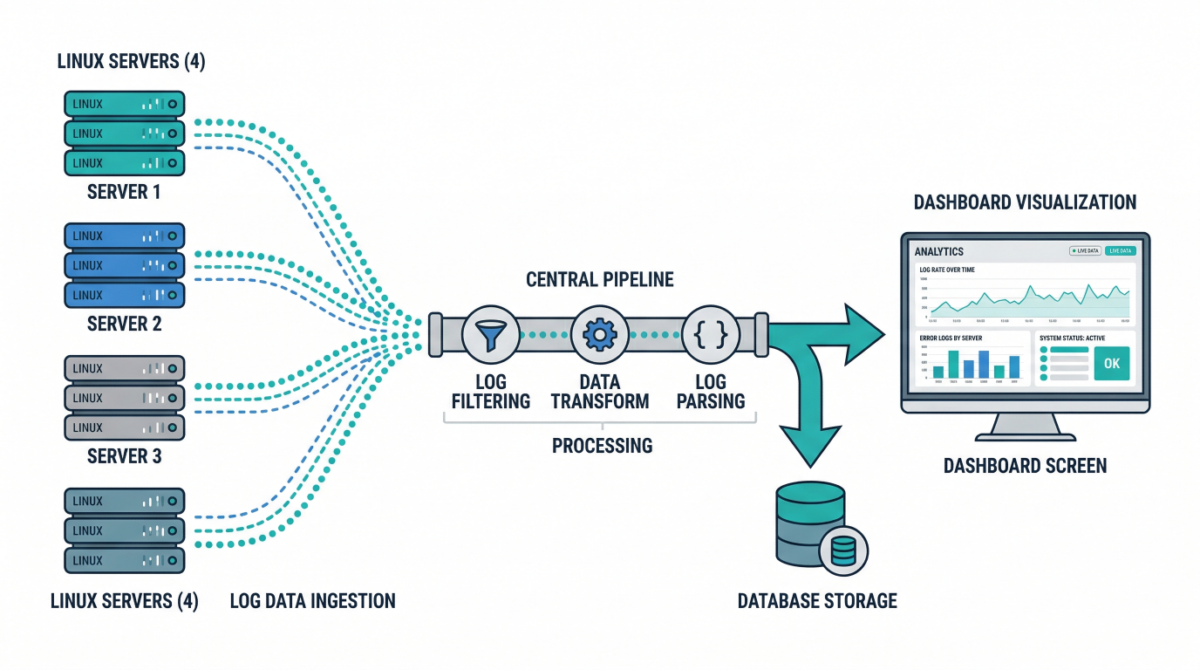
Centralized Logging is Essential

Why centralized logging is essential

In modern infrastructure, logs are everywhere:

  • Linux system logs
  • application logs
  • container logs
  • security and audit logs

When logs stay on individual servers, operations become difficult:

  • troubleshooting takes longer
  • incidents lack visibility
  • correlation between systems is nearly impossible
  • logs may be lost during outages

Centralized logging solves this by aggregating logs into a single, searchable system.

What is centralized logging

Centralized logging is the practice of collecting logs from multiple systems and storing them in a unified platform where they can be:

  • searched
  • analyzed
  • visualized
  • alerted on

Typical flow:

Server → Log shipper → Processing pipeline → Storage → Visualization

Key components of a log pipeline

Log sources

These include:

  • /var/log/syslog, /var/log/auth.log
  • application logs
  • container stdout/stderr
  • cloud service logs

Log shippers

Agents installed on servers to forward logs:

  • lightweight collectors
  • handle buffering and retries
  • ensure reliable delivery

Processing layer

Logs are parsed, enriched, and transformed:

  • add metadata (hostname, environment)
  • normalize formats
  • filter noise

Storage backend

Central system where logs are stored and indexed for querying.

Visualization and alerting

Dashboards and alerts help teams:

  • monitor systems
  • detect anomalies
  • investigate incidents

Common architecture patterns

Basic logging setup

  • Each server runs a log shipper
  • Logs sent to a central server
  • Stored and queried centrally

Good for small to medium environments.

Scalable pipeline architecture

  • Load-balanced ingestion layer
  • Distributed processing nodes
  • Scalable storage cluster

Designed for high-volume environments.

Cloud-native logging

  • Containers emit logs to stdout
  • Logging agents collect from nodes
  • Logs shipped to centralized services

Ideal for Kubernetes environments.

Designing a reliable logging pipeline

Ensure durability

Logs should not be lost during:

  • network interruptions
  • server failures

Use buffering and retry mechanisms.

Structure your logs

Structured logs (JSON) enable:

  • better search
  • easier parsing
  • improved analytics

Enrich logs with metadata

Add fields like:

  • environment (prod/staging)
  • service name
  • region
  • instance ID

This makes filtering and correlation easier.

Implement retention policies

Not all logs need to be stored forever.

Define:

  • short-term hot storage
  • long-term archival

Security considerations

Protect sensitive data

Avoid logging:

  • passwords
  • tokens
  • personal data

Mask or filter sensitive fields.

Control access

Restrict who can view logs, especially:

  • authentication logs
  • audit logs

Enable audit logging

Track access to logging systems themselves.

Practical use cases

Incident response

Quickly correlate logs across systems to identify root causes.

Security monitoring

Detect suspicious behavior:

  • failed login attempts
  • privilege escalation
  • unusual access patterns

Performance troubleshooting

Analyze latency, errors, and system behavior over time.

Compliance and auditing

Maintain logs for regulatory requirements.

Example: Minimal logging pipeline

  1. Install log shipper on each server
  2. Forward logs to central collector
  3. Parse and enrich logs
  4. Store in searchable backend
  5. Build dashboards and alerts

Even a simple setup significantly improves visibility.

Common mistakes to avoid

Storing logs locally only

Logs disappear if the server is lost.

Ignoring log structure

Unstructured logs are difficult to analyze at scale.

No retention strategy

Leads to high storage costs or missing historical data.

Over-logging

Too much noise reduces signal quality and increases cost.

Conclusion

Centralized logging is a foundational capability for:

  • observability
  • security
  • incident response
  • operational excellence

By building a scalable log pipeline, infrastructure teams gain the visibility needed to operate complex systems with confidence.
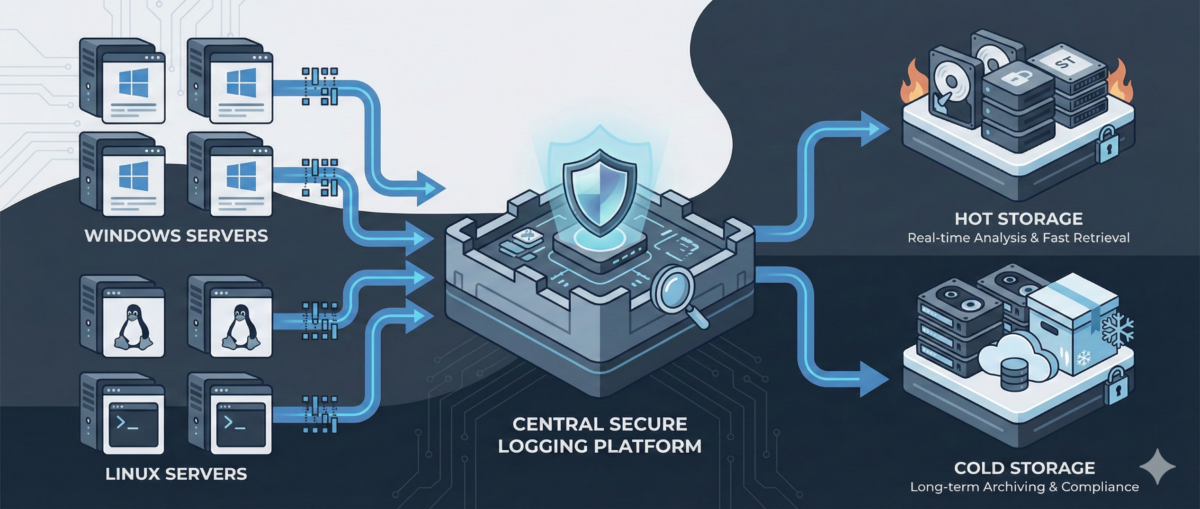
Centralized Logging for Windows and Linux: A Practical Blueprint for IT Ops

Centralized Logging for Windows and Linux: A Practical Blueprint for IT Ops

When something breaks at 02:13 AM, logs are either your best friend—or completely useless.

In mixed environments (Windows + Linux + on-prem + cloud), logs are often:

  • scattered across servers,

  • overwritten too quickly,

  • inaccessible during incidents,

  • or never reviewed until after an outage.

A centralized logging strategy transforms logs from passive files into an operational control system.

This guide outlines how to design a scalable, secure, and useful logging architecture for real-world IT environments.


Why Centralized Logging Is Not Optional Anymore

Incident response speed

Without centralized logs:

  • You SSH/RDP into multiple machines.

  • You manually grep or search Event Viewer.

  • You lose precious time correlating events.

With centralized logging:

  • You search once.

  • You correlate across systems instantly.

  • You reduce Mean Time To Resolution (MTTR).

Security visibility

Modern attacks move laterally.
If logs stay local, detection becomes nearly impossible.

Central logs enable:

  • suspicious login pattern detection

  • privilege escalation tracing

  • anomaly identification across hosts

Compliance and audit

Many standards require:

  • log retention policies

  • tamper-resistant storage

  • traceability of admin actions


Step 1: Define What to Log (Not Everything Is Equal)

Logging everything blindly leads to noise.

Windows (Recommended Sources)

  • Security Event Logs (logon events, privilege use)

  • System logs

  • Application logs

  • PowerShell logs (script block logging)

  • Sysmon (for deeper visibility)

Linux (Recommended Sources)

  • auth.log / secure

  • syslog / journald

  • sudo logs

  • SSH logs

  • application-specific logs (nginx, apache, docker, etc.)

Key Principle

Log based on:

  • security relevance

  • operational value

  • troubleshooting frequency

  • compliance needs


Step 2: Choose an Architecture Model

Option A: Agent-Based Collection

Each server runs a lightweight agent:

  • forwards logs securely

  • buffers during outages

  • supports filtering and parsing

Pros:

  • reliable delivery

  • fine-grained control

Cons:

  • agent lifecycle management required

Option B: Agentless / Pull-Based

Central system pulls logs via:

  • Windows Event Forwarding (WEF)

  • Syslog forwarding

  • API-based integrations

Pros:

  • fewer components per host

Cons:

  • less flexible filtering

  • scaling challenges in large environments

In most real infrastructures, agent-based models scale better.


Step 3: Standardize Log Structure

If Windows logs and Linux logs look completely different, correlation becomes painful.

Normalize Fields

Ensure consistent fields such as:

  • hostname

  • environment (dev/stage/prod)

  • IP address

  • user

  • severity

  • timestamp (UTC strongly recommended)

Add Context

Tag logs with:

  • service name

  • business criticality

  • region

  • patch group or cluster

Context is what turns logs into intelligence.


Step 4: Secure the Logging Pipeline

Logs contain sensitive data:

  • usernames

  • internal IPs

  • command history

  • sometimes secrets (misconfigured apps)

Security Requirements

  • TLS encryption in transit

  • role-based access control

  • separation of admin vs read-only roles

  • immutable or append-only storage

  • log retention policies

Protect Against Log Tampering

Attackers often:

  • delete logs

  • modify local log files

  • disable logging services

Centralized and restricted storage prevents this.


Step 5: Retention and Storage Strategy

Define retention by tier.

Example:

  • Security logs: 180–365 days

  • Operational logs: 30–90 days

  • Debug logs: short-term (7–14 days)

Consider:

  • storage cost vs compliance

  • hot vs cold storage

  • searchable vs archived logs


Step 6: Build Operational Use Cases

Logging is useless without queries and alerts.

Operational Use Cases

  • Service crash detection

  • Repeated restart loops

  • Disk error patterns

  • Failed scheduled tasks

Security Use Cases

  • Multiple failed login attempts

  • Admin group membership changes

  • New service installation

  • Suspicious PowerShell execution

Create dashboards per:

  • infrastructure tier

  • business service

  • security monitoring


Step 7: Avoid Common Logging Mistakes

Logging without monitoring

Collecting logs without alerts or dashboards = expensive storage.

Over-collecting

Too much noise hides real signals.

No ownership

Define:

  • who reviews alerts

  • who maintains parsers

  • who manages retention policies

Logging must be part of operations—not an afterthought.


Conclusion

Centralized logging is not a “SIEM project.”
It is core infrastructure hygiene.

Done correctly, it provides:

  • faster incident response

  • stronger security posture

  • audit readiness

  • operational clarity

Logs are not just records.
They are your infrastructure memory.