GitOps for Infrastructure Teams: From Manual Changes to Declarative Control

GitOps for Infrastructure Teams: From Manual Changes to Declarative Control

Infrastructure teams are under constant pressure: faster deployments, tighter security, more environments, more automation. Yet in many organizations, infrastructure changes still happen through SSH sessions, manual edits, and undocumented tweaks.

This is where GitOps changes the game.

GitOps is not just for Kubernetes-native startups. It is a powerful operating model for infrastructure, security baselines, configuration management, and even automation workflows.

This article explains how infrastructure teams can adopt GitOps pragmatically—without disrupting operations.


What Is GitOps (Beyond the Buzzword)?

At its core, GitOps means:

  • Git is the single source of truth

  • Desired system state is declared in code

  • Changes happen via pull requests

  • Automation reconciles actual state to desired state

  • Drift is detected and corrected automatically

It replaces:

  • “I logged into the server and changed it”
    with:

  • “I submitted a PR that changed the declared state”


Why Infrastructure Teams Struggle Without GitOps

1) Configuration Drift

Two servers built from the same template end up different over time.

Manual fixes, hot patches, and undocumented changes create invisible risk.

2) No Change Traceability

When an incident happens:

  • Who changed the firewall rule?

  • When was that service modified?

  • Why was that port opened?

Without Git history, answers are guesswork.

3) Security Blind Spots

Manual changes often bypass:

  • peer review

  • policy checks

  • security scanning

This creates compliance and audit risks.


Core Components of GitOps for Infra

You don’t need to start with Kubernetes to do GitOps.

1) Infrastructure as Code (IaC)

Use declarative tools like:

  • Terraform

  • Ansible (declarative mode)

  • Pulumi

  • CloudFormation

Infrastructure becomes version-controlled code.


2) Pull Request Workflow

Every change:

  • goes through PR

  • is reviewed

  • is validated automatically

  • is merged only if compliant

This adds:

  • accountability

  • collaboration

  • rollback capability


3) Automated Reconciliation

Automation ensures the real environment matches Git.

Examples:

  • CI/CD pipelines apply Terraform

  • Scheduled drift detection jobs

  • Controllers continuously reconciling state

No more silent drift.


GitOps in Real Infrastructure Scenarios

Scenario 1: Firewall Changes

Old way:

  • SSH into firewall

  • Add rule

  • Forget to document it

GitOps way:

  • Modify firewall rule in code

  • PR reviewed

  • Automated validation checks policy

  • Change applied through pipeline

  • Audit trail preserved


Scenario 2: Linux Server Baseline Hardening

Instead of manually:

  • disabling services

  • editing sysctl

  • adjusting SSH configs

Define:

  • baseline role in Ansible

  • security profile in code

  • versioned config

Drift detection alerts if someone changes settings manually.


Scenario 3: n8n Workflow Deployment

Even automation platforms benefit from GitOps.

Instead of:

  • editing workflows directly in UI

You:

  • export workflows as JSON

  • store in Git

  • review changes

  • deploy via pipeline

Now automation itself is controlled and auditable.


The Security Benefits of GitOps

1) Least Privilege Enforcement

Direct production access can be reduced:

  • Engineers don’t need SSH for routine changes.

  • Pipelines execute approved changes.

2) Audit-Ready by Design

Git history becomes:

  • change log

  • approval record

  • rollback mechanism

3) Faster Incident Recovery

Rollback = revert commit + pipeline run.

No guessing what “used to work.”


A Practical Adoption Roadmap

Phase 1: Version Everything

  • Move infra configs to Git

  • Protect main branch

  • Enforce PR reviews

No automation changes yet—just discipline.


Phase 2: Add Automated Validation

  • Linting

  • Policy-as-code checks

  • Security scanning

  • Plan previews (e.g., Terraform plan in PR)


Phase 3: Restrict Manual Production Changes

  • Limit direct SSH

  • Require pipeline for infra updates

  • Monitor drift


Phase 4: Continuous Reconciliation

  • Scheduled drift detection

  • Automated correction (where safe)

  • Alerting on unauthorized changes


Common Mistakes

“GitOps means no humans touch prod.”

Not realistic. Break-glass access must exist—but logged and controlled.


“We need Kubernetes first.”

False. GitOps is an operational model, not a platform requirement.


“It slows us down.”

Initially, yes.
Long term: fewer outages, faster rollbacks, stronger security.


Conclusion

GitOps is not about tools.
It’s about control, visibility, and repeatability.

For infrastructure teams, it means:

  • fewer midnight surprises

  • better audit posture

  • safer automation

  • and less reliance on fragile tribal knowledge

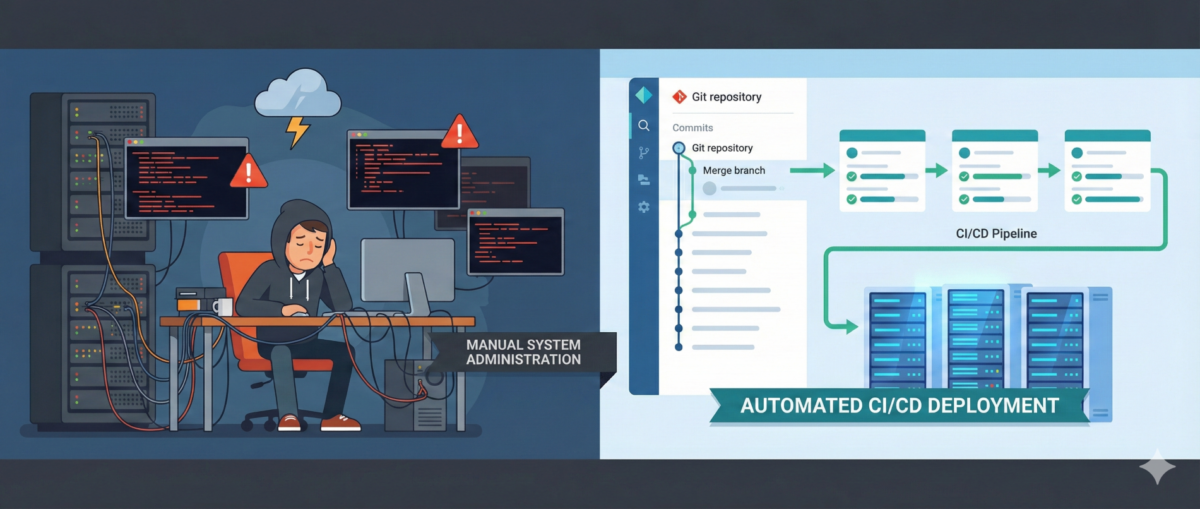
Manual changes scale chaos.
Declarative control scales stability.
Windows OS Deployment via Ansible AWX Server on ESX Enviroment

Windows OS Deployment via Ansible AWX Server on ESX Enviroment

Hi all, yes it has been a while since my last publish but believe me, in this days , I mean at home office working times. I am working harder and much busy than office working times.

This post I would like to share how to automatize my Windows OS installations on ESX environment via Ansible AWX system.

For this automation steps we need some knowledge about the tools and environment. I will not explain how to install the system or detailed explanation about the systems, I will give you some descriptions , you need follow the documents and learn the tools basics.

What is AWX;

You can find many documents at the internet about it but github project page simple explanation is ; “AWX provides a web-based user interface, REST API, and task engine built on top of Ansible. It is the upstream project for Tower, a commercial derivative of AWX. ” You will find many detailed how to documents about it at “https://github.com/ansible/awx

What is Ansible ;

Ansible is an IT automation tool. It can configure systems, deploy software, and orchestrate more advanced IT tasks such as continuous deployments or zero downtime rolling updates.  Source Ansible Documentation page

What is VMware ESX;

Most of IT people has deep knowledge what is this and how to manage it. Yes most popular Hardware Virtualization solution for corporate IT environment . You can find the latest updates on this page about it.

Lets Continue with the Windows OS Installation steps;

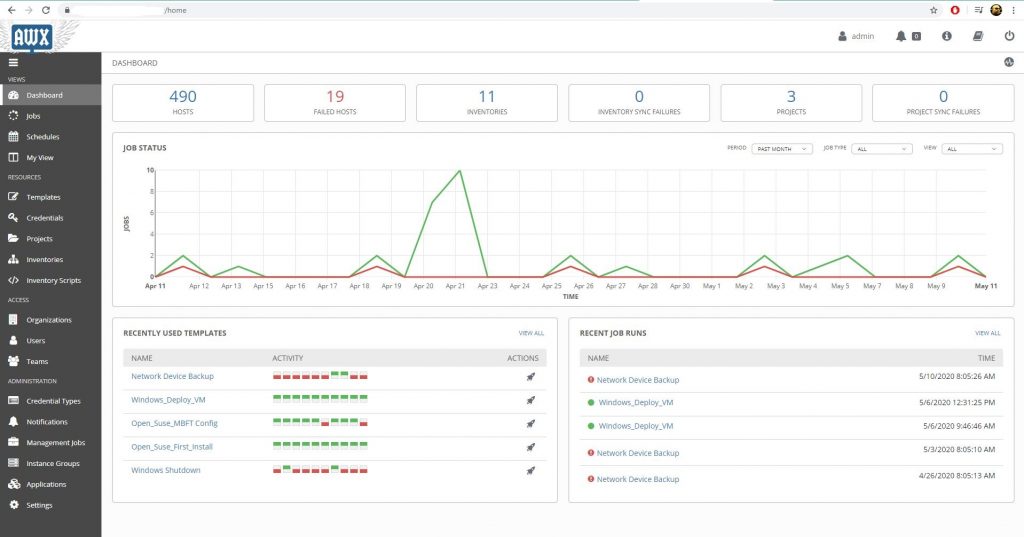
This is the general view of the AWX dashboard.

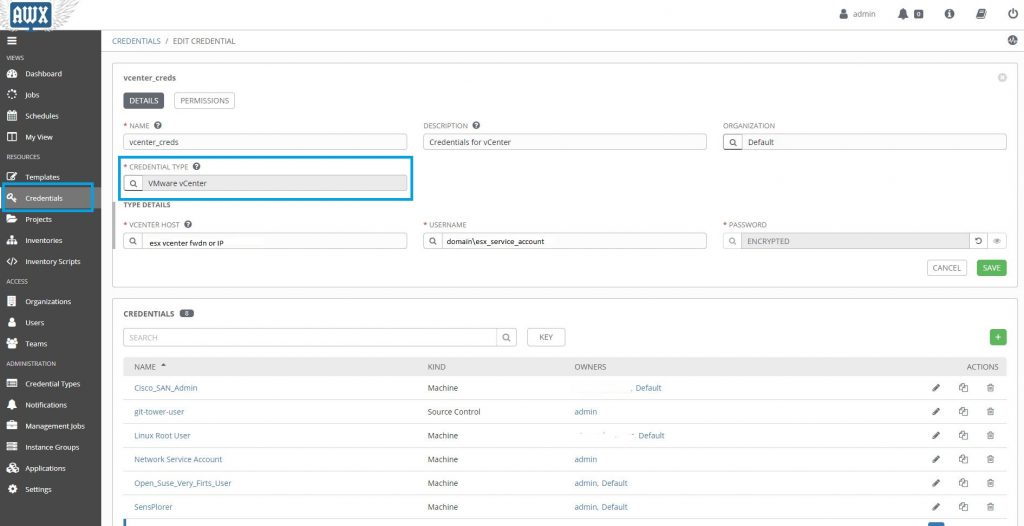
First things first , Lets start with ESX Vcenter access credentials, that user need to have full admin rights on ESX system.

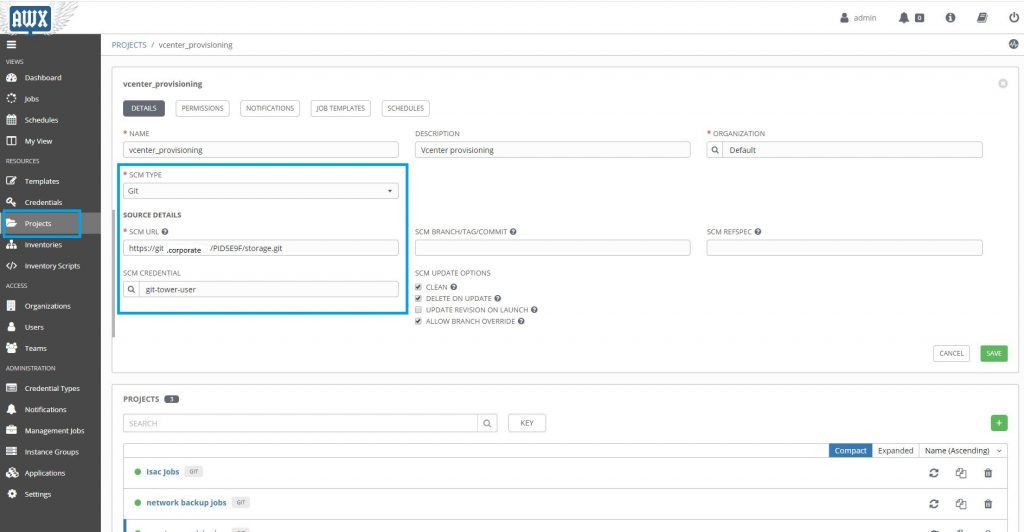
Now for source code management we need to create a project on AWX. I am storing the yaml codes on our corporate github.

You need  also create credentials for github access to download yaml codes. Same as esxvcenter access cred.

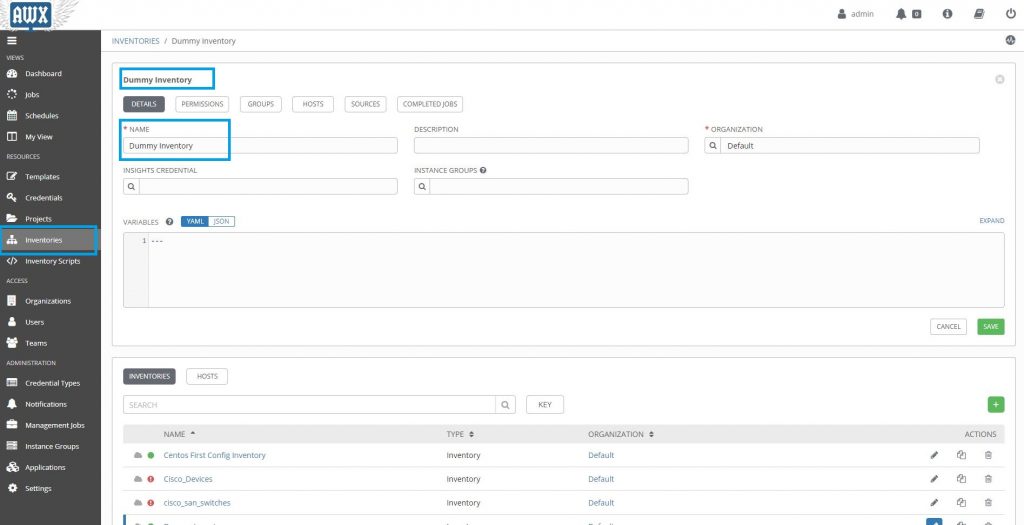
Now we need a dummy inventory group for esx server access .  Dummy inventory is just an empty inventory group.

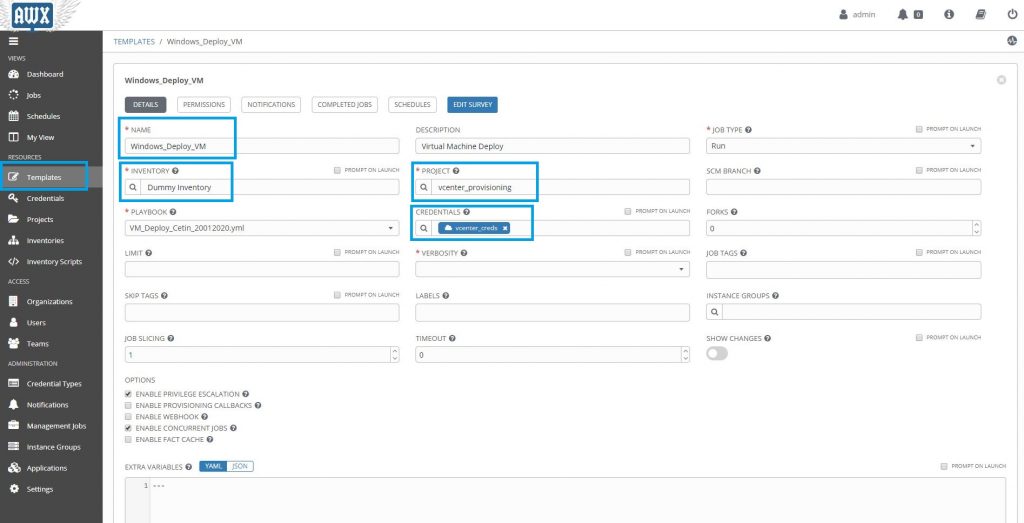
Now time to create a template for our windows OS deploy job. In this section we need to choose which inventory group will use for this,  which project will use for the yaml codes group and which yaml playbook code file should use for it.

Let me share my playbook yaml file with you for give you some idea about the Virtual Windows OS deployment.

I am sharing the code as downloadable file because yaml file indents very important so web site copy paste could harm the indents.

VM_Deploy_Cetin_20012020.yml


---

- name: Create VM Instance
  hosts: localhost
  connection: local
  gather_facts: false


  tasks:

    - name: Check if all variables have been defined
      fail:
        msg: "{{ item }} is not defined"
      when: "{{ item }} is not defined"
      with_items:
        - datacenter
        - cluster
        - folder
        - vmname
        - datastore
        - vlan_name
        - template
        - ip
        - netmask
        - gateway
        - dns1
        - dns2
        - template
        - vm_password
        - fqdn_domain
        - domain_join_account
        - domain_join_password


    - name: Create a VM from a template
      vmware_guest:
        hostname: '{{ lookup("env", "VMWARE_HOST") }}'
        username: '{{ lookup("env", "VMWARE_USER") }}'
        password: '{{ lookup("env", "VMWARE_PASSWORD") }}'
        datacenter: "{{ datacenter }}"
        cluster: "{{ cluster }}"
        folder: "{{ folder }}"
        validate_certs: no
        name: "{{ vmname }}"
        template: "{{ template }}"
#        wait_for_ip_address: no
        datastore: "{{ datastore }}"
#        - name: Add NIC to VM
#          ovirt_nic:
#          state: present
#          vm: "{{ vmname }}"
#          name: "{{ vlan_name }}"
#          interface: vmxnet3
#         mac_address: 00:1a:4a:16:01:56
#          profile: ovirtmgmt
#          network: ovirtmgmt
        state: poweredon
        networks:
        - name: "{{ vlan_name }}"
          device_type: vmxnet3
          start_connected: yes
          ip: '{{ ip }}'
          netmask: "{{ netmask }}"
          gateway: "{{ gateway }}"
          dns_servers:
           - "{{dns1}}"
           - "{{dns2}}"
          wait_for_ip_address: yes

        customization:
          autologon: yes
          hostname: "{{ vmname }}"
          password: "{{ vm_password }}"
          domainadmin: "{{ domain_join_account }}"
          domainadminpassword: "{{ domain_join_password }}"
          joindomain: "{{ fqdn_domain }}"
          runonce:
          - C:\Windows\System32\cmd.exe /c "C:\Ansible_Workaround\domain_group.cmd"

      register: deploy_vm
      ignore_errors: yes

    - name: Result of Virtual machine
      debug:
        var: deploy_vm

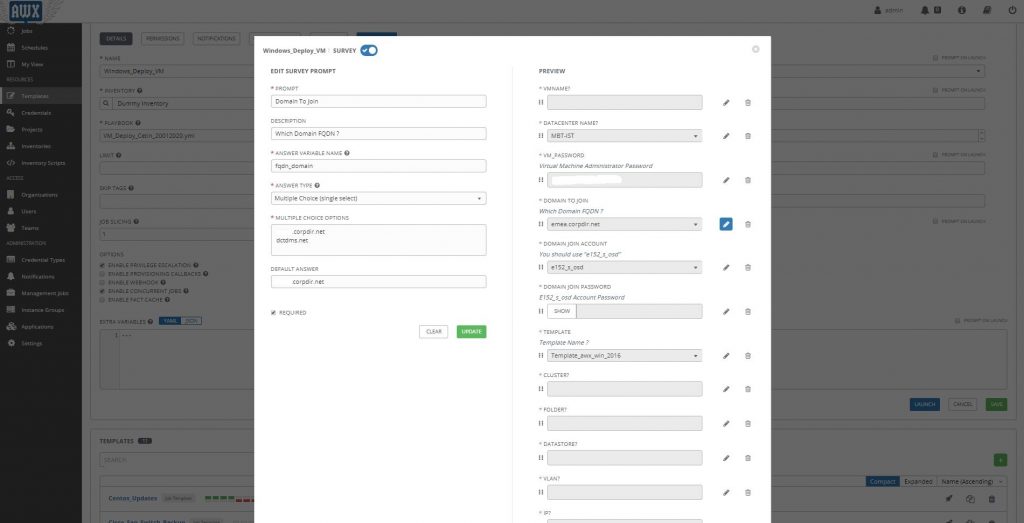
when you check the code you will see defined couple of variables in this code like ; datacenter,cluster,folder,ip,template etc..

We need the answer this variables at the AWX system. For this purpose we need to reedit the template and define  survey for it. Every step of this survey need to answer in the code.  for example “fqdn_domain” check the screenshot.

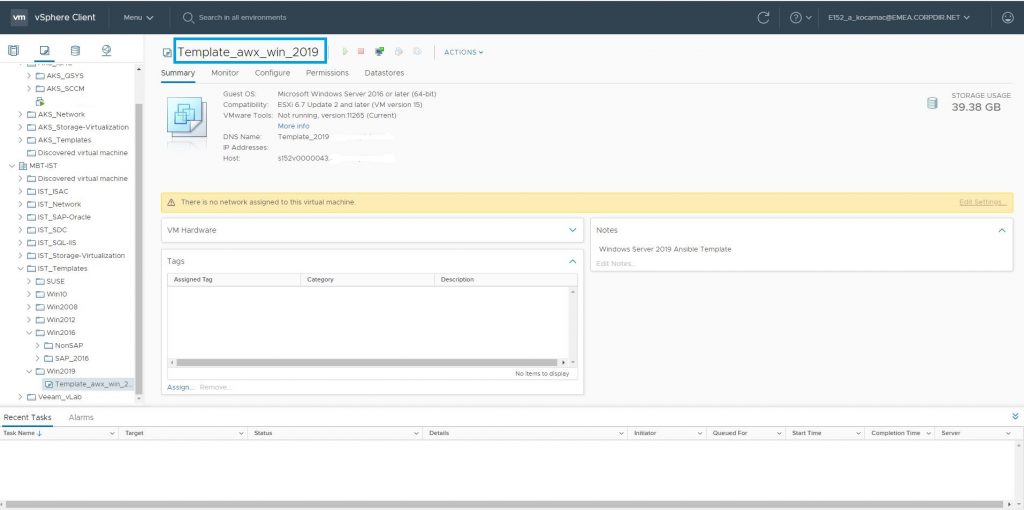
Now we need a Virtual Machine Template for the deployment usage. I have created many templates for this purpose for every Windows OS versions.

As you know ESX enviroment can generalize the cloned template to machine. We are triggering  this option automatically while cloning the machine.

The important point is in that template you need to install vmtools. Because awx tells the operation steps to  the esx, esx customizing the  Windows OS via vmtools.

On my environment I am not a domain admin group member. I am a member of specific OU admin group , that’s why I have put a small run ones script to template machine “C:\Ansible_Workaround\domain_group.cmd”

@echo off
net localgroup administrators domain\OU_Admins /ADD
TZUTIL /s "Turkey Standard Time"

Lets demonstrate a deployment;

First go to template and check it ones more; If everything seems OK, press the rocket icon and start the deployment. Answer the questions about the VM name, Ip,Gateway,LocalAdmin Passwords etc.

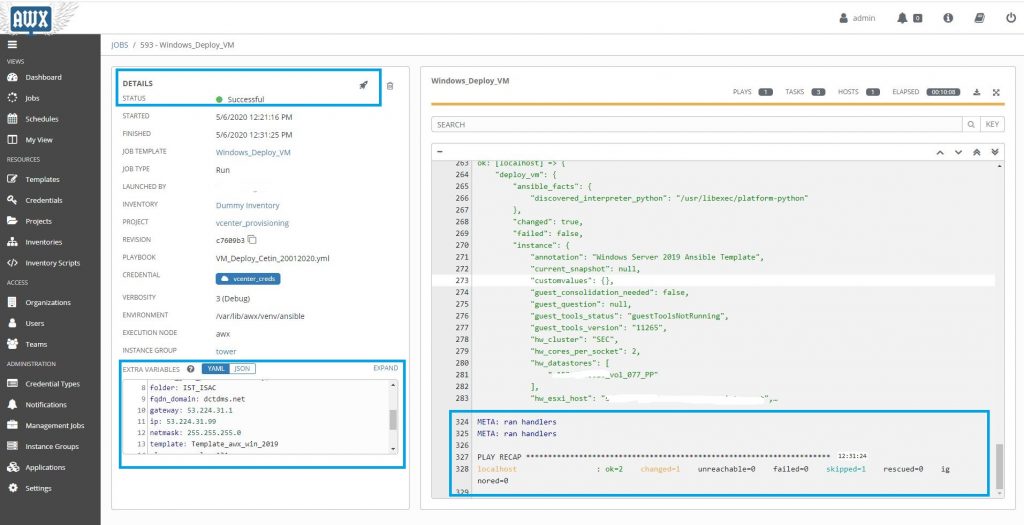
After it click the deploy. It start to deploy and depend about your environment speed , it will take time about ten minutes.

If you success you will see a screen like that;

I hope , This document  will help you have an idea about the ansible AWX and Windows deployment process.

Conclusion ;

Ansible is a big sea in IT world. If you learn how to sail in it , you will find many automation variations for your daily job. For example; I am using it take Cisco Switch backups in every week more than hundred device. May be it will be another  story on this blog.

I would like to special thanks to my colleague Tolga Asik for his cooperation with his VM knowladge  and also Mustafa  Sarı with his storage knowledge.