
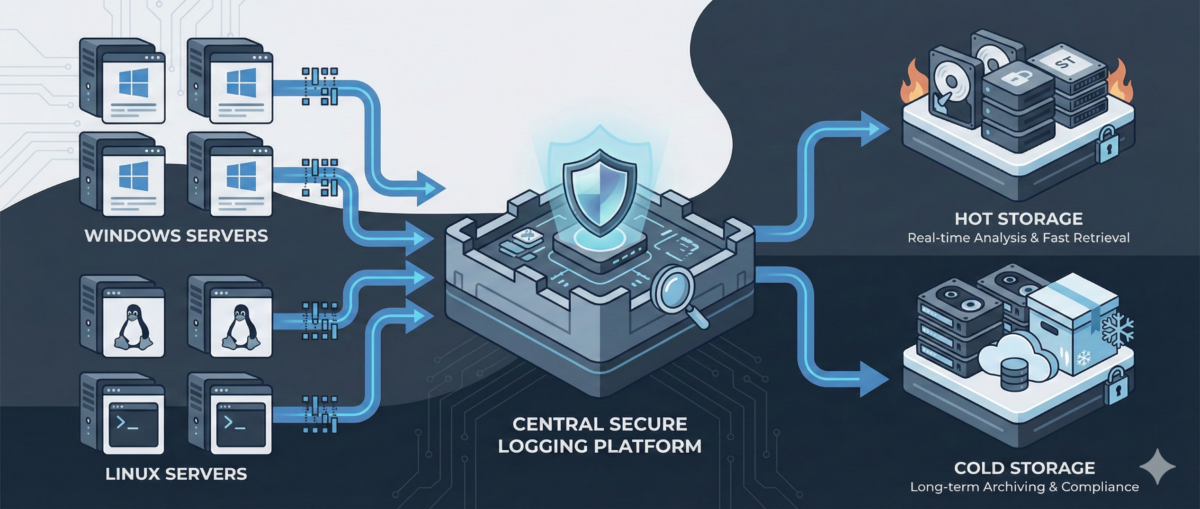
Centralized Logging for Windows and Linux: A Practical Blueprint for IT Ops

Centralized Logging for Windows and Linux: A Practical Blueprint for IT Ops

When something breaks at 02:13 AM, logs are either your best friend—or completely useless.

In mixed environments (Windows + Linux + on-prem + cloud), logs are often:

  • scattered across servers,

  • overwritten too quickly,

  • inaccessible during incidents,

  • or never reviewed until after an outage.

A centralized logging strategy transforms logs from passive files into an operational control system.

This guide outlines how to design a scalable, secure, and useful logging architecture for real-world IT environments.


Why Centralized Logging Is Not Optional Anymore

Incident response speed

Without centralized logs:

  • You SSH/RDP into multiple machines.

  • You manually grep or search Event Viewer.

  • You lose precious time correlating events.

With centralized logging:

  • You search once.

  • You correlate across systems instantly.

  • You reduce Mean Time To Resolution (MTTR).

Security visibility

Modern attacks move laterally.
If logs stay local, detection becomes nearly impossible.

Central logs enable:

  • suspicious login pattern detection

  • privilege escalation tracing

  • anomaly identification across hosts

Compliance and audit

Many standards require:

  • log retention policies

  • tamper-resistant storage

  • traceability of admin actions


Step 1: Define What to Log (Not Everything Is Equal)

Logging everything blindly leads to noise.

Windows (Recommended Sources)

  • Security Event Logs (logon events, privilege use)

  • System logs

  • Application logs

  • PowerShell logs (script block logging)

  • Sysmon (for deeper visibility)

Linux (Recommended Sources)

  • auth.log / secure

  • syslog / journald

  • sudo logs

  • SSH logs

  • application-specific logs (nginx, apache, docker, etc.)

Key Principle

Log based on:

  • security relevance

  • operational value

  • troubleshooting frequency

  • compliance needs


Step 2: Choose an Architecture Model

Option A: Agent-Based Collection

Each server runs a lightweight agent:

  • forwards logs securely

  • buffers during outages

  • supports filtering and parsing

Pros:

  • reliable delivery

  • fine-grained control

Cons:

  • agent lifecycle management required

Option B: Agentless / Pull-Based

Central system pulls logs via:

  • Windows Event Forwarding (WEF)

  • Syslog forwarding

  • API-based integrations

Pros:

  • fewer components per host

Cons:

  • less flexible filtering

  • scaling challenges in large environments

In most real infrastructures, agent-based models scale better.


Step 3: Standardize Log Structure

If Windows logs and Linux logs look completely different, correlation becomes painful.

Normalize Fields

Ensure consistent fields such as:

  • hostname

  • environment (dev/stage/prod)

  • IP address

  • user

  • severity

  • timestamp (UTC strongly recommended)

Add Context

Tag logs with:

  • service name

  • business criticality

  • region

  • patch group or cluster

Context is what turns logs into intelligence.


Step 4: Secure the Logging Pipeline

Logs contain sensitive data:

  • usernames

  • internal IPs

  • command history

  • sometimes secrets (misconfigured apps)

Security Requirements

  • TLS encryption in transit

  • role-based access control

  • separation of admin vs read-only roles

  • immutable or append-only storage

  • log retention policies

Protect Against Log Tampering

Attackers often:

  • delete logs

  • modify local log files

  • disable logging services

Centralized and restricted storage prevents this.


Step 5: Retention and Storage Strategy

Define retention by tier.

Example:

  • Security logs: 180–365 days

  • Operational logs: 30–90 days

  • Debug logs: short-term (7–14 days)

Consider:

  • storage cost vs compliance

  • hot vs cold storage

  • searchable vs archived logs


Step 6: Build Operational Use Cases

Logging is useless without queries and alerts.

Operational Use Cases

  • Service crash detection

  • Repeated restart loops

  • Disk error patterns

  • Failed scheduled tasks

Security Use Cases

  • Multiple failed login attempts

  • Admin group membership changes

  • New service installation

  • Suspicious PowerShell execution

Create dashboards per:

  • infrastructure tier

  • business service

  • security monitoring


Step 7: Avoid Common Logging Mistakes

Logging without monitoring

Collecting logs without alerts or dashboards = expensive storage.

Over-collecting

Too much noise hides real signals.

No ownership

Define:

  • who reviews alerts

  • who maintains parsers

  • who manages retention policies

Logging must be part of operations—not an afterthought.


Conclusion

Centralized logging is not a “SIEM project.”
It is core infrastructure hygiene.

Done correctly, it provides:

  • faster incident response

  • stronger security posture

  • audit readiness

  • operational clarity

Logs are not just records.
They are your infrastructure memory.
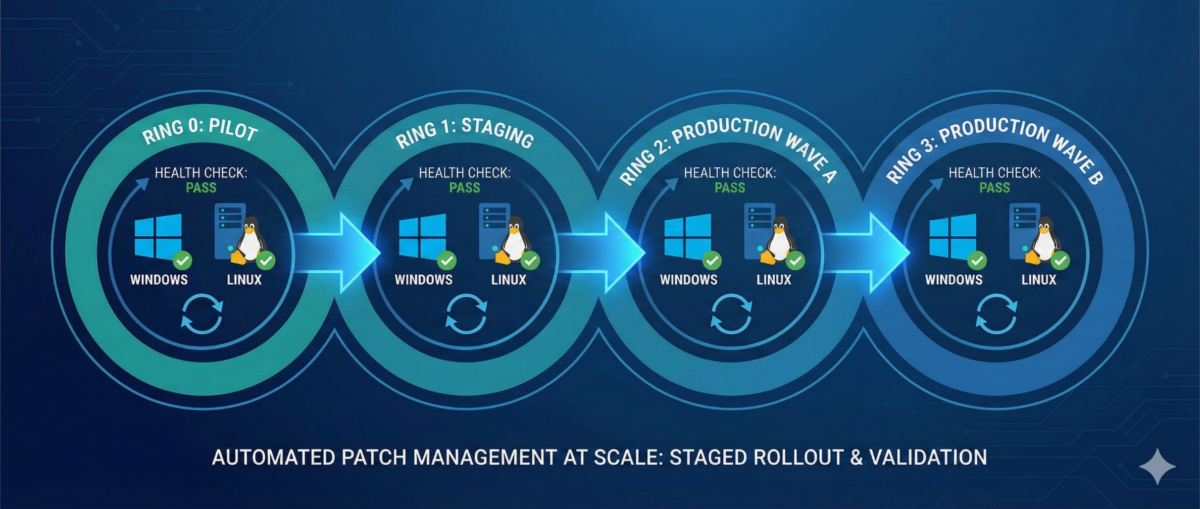
Patch Management at Scale: How to Update Windows and Linux Without Breaking Production

Patch Management at Scale: How to Update Windows and Linux Without Breaking Production

Patching is one of the highest ROI security controls—yet it’s also one of the fastest ways to break production if done poorly.

In mixed environments (Windows + Linux + cloud + on‑prem), patching often becomes:

  • a monthly fire drill,

  • a spreadsheet-driven process,

  • or “we’ll do it later” until an incident forces your hand.

This article outlines a practical patch management approach you can roll out in real infrastructure: predictable, auditable, and designed to minimize downtime.


Why Patch Management Fails in Real Ops

Inconsistent inventories

If you can’t answer “what systems exist?”, patching becomes guesswork. Shadow VMs, old endpoints, and forgotten servers create blind spots.

Unclear ownership

“Who owns this server?” is a common patch blocker. Without service ownership, patching stalls.

One-size-fits-all windows

Patching “everything on Sunday night” ignores business criticality and dependencies.

No verification loop

Many teams patch, reboot, and move on—without validating service health, kernel versions, or application behavior.


Patch Management Goals (What “Good” Looks Like)

A mature patch program should deliver:

Predictability

  • Fixed cadence for routine updates

  • Defined emergency process for critical CVEs

Risk-based prioritization

  • Critical internet-facing systems patched first

  • Lower-risk systems batched later

Minimal disruption

  • Rolling updates

  • Maintenance windows aligned to service needs

  • Automated prechecks/postchecks

Evidence and auditability

  • Patch status reporting

  • Change tracking

  • Exception handling with expiry dates


Step 1: Build a Reliable Asset Inventory

What to capture

  • Hostname, IP, OS/version, kernel/build

  • Environment (dev/stage/prod)

  • Criticality tier (1–4)

  • Owner/team and service name

  • Patch group (e.g., “prod-web-rolling”)

Practical sources

  • AD + SCCM/Intune (Windows)

  • CMDB (if accurate)

  • Cloud APIs (AWS/GCP/Azure inventory)

  • Linux tools (e.g., osquery, landscape, spacewalk equivalents)

  • Monitoring/EDR platforms (often best truth source)


Step 2: Define Patch Rings and Maintenance Policies

Patch rings reduce blast radius.

Example ring model

Ring 0 — Lab/Canary

  • First patch landing zone

  • Includes representative app stacks

Ring 1 — Low-risk production

  • Internal services, non-customer-facing nodes

Ring 2 — Core production

  • Customer-facing workloads with rolling capability

Ring 3 — Critical/Stateful

  • Databases, domain controllers, cluster control planes

  • Heavier change control, deeper validation

Service-based maintenance windows

Instead of one global window:

  • align patching to service usage patterns,

  • and use rolling updates where possible.


Step 3: Standardize on Tooling Per Platform

Windows (common patterns)

  • Intune / WSUS / SCCM / Windows Update for Business

  • GPO for policy enforcement

  • Maintenance windows tied to device groups

Key practices:

  • staged deployments (rings)

  • automatic reboots only in controlled windows

  • reporting for “installed vs pending reboot”

Linux (common patterns)

  • configuration management (Ansible/Salt/Puppet/Chef)

  • distro-native repos + internal mirrors

  • unattended-upgrades (carefully) for low-risk groups

Key practices:

  • pin critical packages if required

  • kernel update strategy (reboot coordination)

  • consistent repo configuration


Step 4: Automate Prechecks and Postchecks

This is where patching becomes safe.

Prechecks (before patching)

  • disk space and inode availability

  • pending package locks / broken deps

  • snapshot/backup status (where applicable)

  • service health baseline (CPU/mem, error rates)

  • cluster state (no degraded nodes)

Postchecks (after patching)

  • OS build / kernel version updated

  • reboot completed and uptime as expected

  • service is healthy (HTTP checks, synthetic tests)

  • logs show no startup failures

  • monitoring confirms normal KPIs


Step 5: Reboot Strategy Without Downtime

Stateless tiers: rolling restarts

  • drain one node at a time

  • patch + reboot

  • verify health

  • re-add to pool

  • proceed to next node

Stateful tiers: controlled approaches

  • leverage replication/failover where possible

  • patch secondaries first

  • promote/demote intentionally

  • schedule longer windows and validate data integrity


Step 6: Handling Critical CVEs (Out-of-Band)

When a critical CVE drops:

  1. Identify affected assets quickly (inventory is everything)

  2. Prioritize internet-facing and high-privilege systems

  3. Patch canary first (short validation)

  4. Roll through rings with accelerated windows

  5. Document exceptions with deadlines


Step 7: Reporting, Exceptions, and Compliance

Metrics worth tracking

  • Patch compliance % by ring and environment

  • Mean time to patch (MTTP) for critical CVEs

  • Reboot compliance

  • of exceptions and time-to-expiry

Exception policy (must-have)

If a system can’t be patched:

  • require risk acceptance approval

  • define compensating controls (WAF, isolation, hardening)

  • set an expiry date (no “forever exceptions”)


Conclusion

Patch management isn’t “install updates.”
It’s a repeatable operational system:

  • inventory → rings → controlled rollout

  • automation → verification → reporting

  • exceptions with deadlines, not excuses

If you run Windows and Linux at scale, patching can be both fast and safe—but only when it’s treated like an engineered process.