
Centralized Logging for Windows and Linux: A Practical Blueprint for IT Ops

Centralized Logging for Windows and Linux: A Practical Blueprint for IT Ops

When something breaks at 02:13 AM, logs are either your best friend—or completely useless.

In mixed environments (Windows + Linux + on-prem + cloud), logs are often:

  • scattered across servers,

  • overwritten too quickly,

  • inaccessible during incidents,

  • or never reviewed until after an outage.

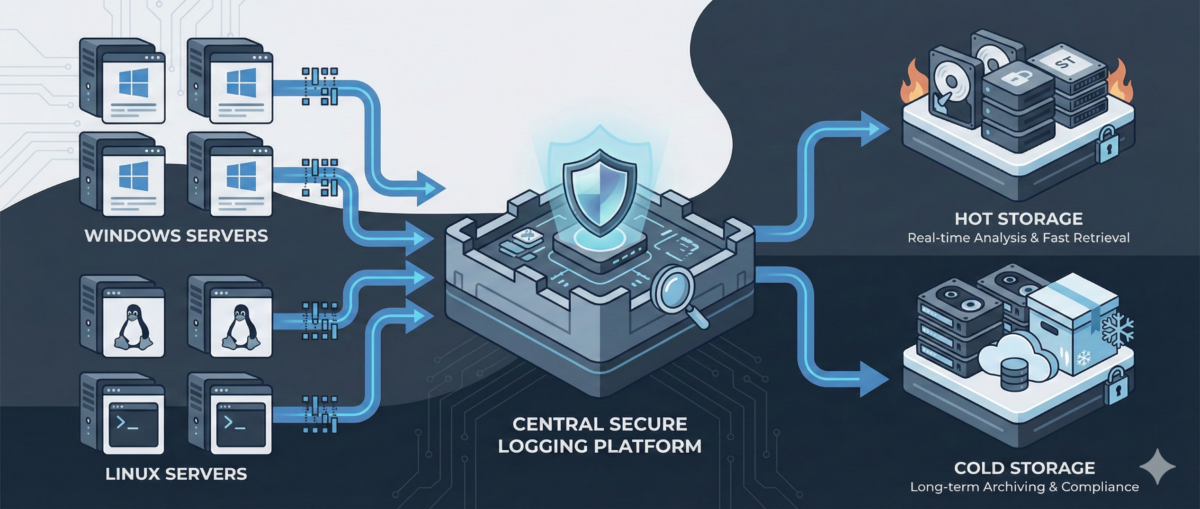
A centralized logging strategy transforms logs from passive files into an operational control system.

This guide outlines how to design a scalable, secure, and useful logging architecture for real-world IT environments.


Why Centralized Logging Is Not Optional Anymore

Incident response speed

Without centralized logs:

  • You SSH/RDP into multiple machines.

  • You manually grep or search Event Viewer.

  • You lose precious time correlating events.

With centralized logging:

  • You search once.

  • You correlate across systems instantly.

  • You reduce Mean Time To Resolution (MTTR).

Security visibility

Modern attacks move laterally.
If logs stay local, detection becomes nearly impossible.

Central logs enable:

  • suspicious login pattern detection

  • privilege escalation tracing

  • anomaly identification across hosts

Compliance and audit

Many standards require:

  • log retention policies

  • tamper-resistant storage

  • traceability of admin actions


Step 1: Define What to Log (Not Everything Is Equal)

Logging everything blindly leads to noise.

Windows (Recommended Sources)

  • Security Event Logs (logon events, privilege use)

  • System logs

  • Application logs

  • PowerShell logs (script block logging)

  • Sysmon (for deeper visibility)

Linux (Recommended Sources)

  • auth.log / secure

  • syslog / journald

  • sudo logs

  • SSH logs

  • application-specific logs (nginx, apache, docker, etc.)

Key Principle

Log based on:

  • security relevance

  • operational value

  • troubleshooting frequency

  • compliance needs


Step 2: Choose an Architecture Model

Option A: Agent-Based Collection

Each server runs a lightweight agent:

  • forwards logs securely

  • buffers during outages

  • supports filtering and parsing

Pros:

  • reliable delivery

  • fine-grained control

Cons:

  • agent lifecycle management required

Option B: Agentless / Pull-Based

Central system pulls logs via:

  • Windows Event Forwarding (WEF)

  • Syslog forwarding

  • API-based integrations

Pros:

  • fewer components per host

Cons:

  • less flexible filtering

  • scaling challenges in large environments

In most real infrastructures, agent-based models scale better.


Step 3: Standardize Log Structure

If Windows logs and Linux logs look completely different, correlation becomes painful.

Normalize Fields

Ensure consistent fields such as:

  • hostname

  • environment (dev/stage/prod)

  • IP address

  • user

  • severity

  • timestamp (UTC strongly recommended)

Add Context

Tag logs with:

  • service name

  • business criticality

  • region

  • patch group or cluster

Context is what turns logs into intelligence.


Step 4: Secure the Logging Pipeline

Logs contain sensitive data:

  • usernames

  • internal IPs

  • command history

  • sometimes secrets (misconfigured apps)

Security Requirements

  • TLS encryption in transit

  • role-based access control

  • separation of admin vs read-only roles

  • immutable or append-only storage

  • log retention policies

Protect Against Log Tampering

Attackers often:

  • delete logs

  • modify local log files

  • disable logging services

Centralized and restricted storage prevents this.


Step 5: Retention and Storage Strategy

Define retention by tier.

Example:

  • Security logs: 180–365 days

  • Operational logs: 30–90 days

  • Debug logs: short-term (7–14 days)

Consider:

  • storage cost vs compliance

  • hot vs cold storage

  • searchable vs archived logs


Step 6: Build Operational Use Cases

Logging is useless without queries and alerts.

Operational Use Cases

  • Service crash detection

  • Repeated restart loops

  • Disk error patterns

  • Failed scheduled tasks

Security Use Cases

  • Multiple failed login attempts

  • Admin group membership changes

  • New service installation

  • Suspicious PowerShell execution

Create dashboards per:

  • infrastructure tier

  • business service

  • security monitoring


Step 7: Avoid Common Logging Mistakes

Logging without monitoring

Collecting logs without alerts or dashboards = expensive storage.

Over-collecting

Too much noise hides real signals.

No ownership

Define:

  • who reviews alerts

  • who maintains parsers

  • who manages retention policies

Logging must be part of operations—not an afterthought.


Conclusion

Centralized logging is not a “SIEM project.”
It is core infrastructure hygiene.

Done correctly, it provides:

  • faster incident response

  • stronger security posture

  • audit readiness

  • operational clarity

Logs are not just records.
They are your infrastructure memory.
GitOps for Infrastructure Teams: From Manual Changes to Declarative Control

GitOps for Infrastructure Teams: From Manual Changes to Declarative Control

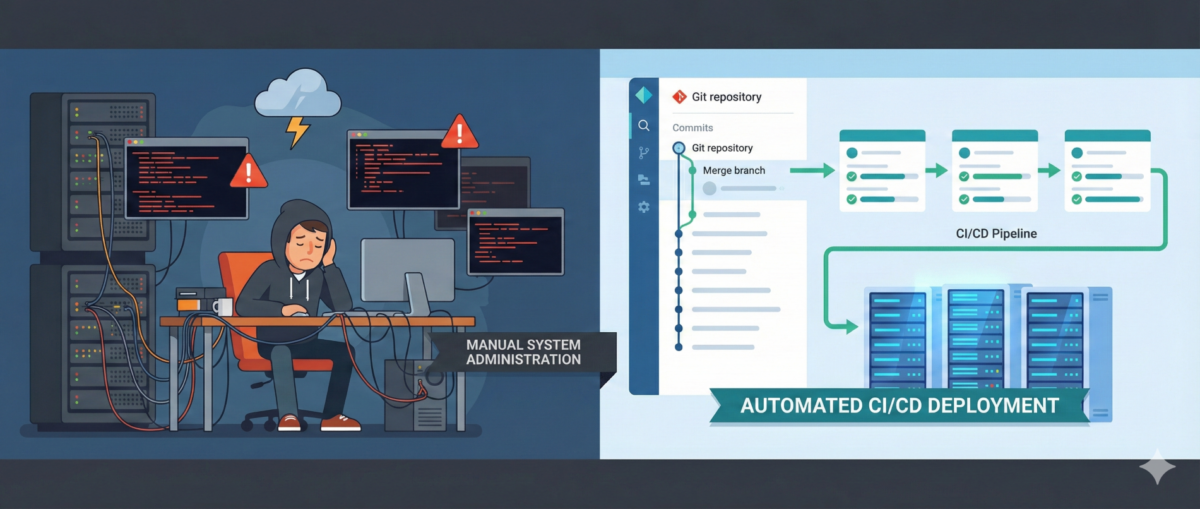
Infrastructure teams are under constant pressure: faster deployments, tighter security, more environments, more automation. Yet in many organizations, infrastructure changes still happen through SSH sessions, manual edits, and undocumented tweaks.

This is where GitOps changes the game.

GitOps is not just for Kubernetes-native startups. It is a powerful operating model for infrastructure, security baselines, configuration management, and even automation workflows.

This article explains how infrastructure teams can adopt GitOps pragmatically—without disrupting operations.


What Is GitOps (Beyond the Buzzword)?

At its core, GitOps means:

  • Git is the single source of truth

  • Desired system state is declared in code

  • Changes happen via pull requests

  • Automation reconciles actual state to desired state

  • Drift is detected and corrected automatically

It replaces:

  • “I logged into the server and changed it”
    with:

  • “I submitted a PR that changed the declared state”


Why Infrastructure Teams Struggle Without GitOps

1) Configuration Drift

Two servers built from the same template end up different over time.

Manual fixes, hot patches, and undocumented changes create invisible risk.

2) No Change Traceability

When an incident happens:

  • Who changed the firewall rule?

  • When was that service modified?

  • Why was that port opened?

Without Git history, answers are guesswork.

3) Security Blind Spots

Manual changes often bypass:

  • peer review

  • policy checks

  • security scanning

This creates compliance and audit risks.


Core Components of GitOps for Infra

You don’t need to start with Kubernetes to do GitOps.

1) Infrastructure as Code (IaC)

Use declarative tools like:

  • Terraform

  • Ansible (declarative mode)

  • Pulumi

  • CloudFormation

Infrastructure becomes version-controlled code.


2) Pull Request Workflow

Every change:

  • goes through PR

  • is reviewed

  • is validated automatically

  • is merged only if compliant

This adds:

  • accountability

  • collaboration

  • rollback capability


3) Automated Reconciliation

Automation ensures the real environment matches Git.

Examples:

  • CI/CD pipelines apply Terraform

  • Scheduled drift detection jobs

  • Controllers continuously reconciling state

No more silent drift.


GitOps in Real Infrastructure Scenarios

Scenario 1: Firewall Changes

Old way:

  • SSH into firewall

  • Add rule

  • Forget to document it

GitOps way:

  • Modify firewall rule in code

  • PR reviewed

  • Automated validation checks policy

  • Change applied through pipeline

  • Audit trail preserved


Scenario 2: Linux Server Baseline Hardening

Instead of manually:

  • disabling services

  • editing sysctl

  • adjusting SSH configs

Define:

  • baseline role in Ansible

  • security profile in code

  • versioned config

Drift detection alerts if someone changes settings manually.


Scenario 3: n8n Workflow Deployment

Even automation platforms benefit from GitOps.

Instead of:

  • editing workflows directly in UI

You:

  • export workflows as JSON

  • store in Git

  • review changes

  • deploy via pipeline

Now automation itself is controlled and auditable.


The Security Benefits of GitOps

1) Least Privilege Enforcement

Direct production access can be reduced:

  • Engineers don’t need SSH for routine changes.

  • Pipelines execute approved changes.

2) Audit-Ready by Design

Git history becomes:

  • change log

  • approval record

  • rollback mechanism

3) Faster Incident Recovery

Rollback = revert commit + pipeline run.

No guessing what “used to work.”


A Practical Adoption Roadmap

Phase 1: Version Everything

  • Move infra configs to Git

  • Protect main branch

  • Enforce PR reviews

No automation changes yet—just discipline.


Phase 2: Add Automated Validation

  • Linting

  • Policy-as-code checks

  • Security scanning

  • Plan previews (e.g., Terraform plan in PR)


Phase 3: Restrict Manual Production Changes

  • Limit direct SSH

  • Require pipeline for infra updates

  • Monitor drift


Phase 4: Continuous Reconciliation

  • Scheduled drift detection

  • Automated correction (where safe)

  • Alerting on unauthorized changes


Common Mistakes

“GitOps means no humans touch prod.”

Not realistic. Break-glass access must exist—but logged and controlled.


“We need Kubernetes first.”

False. GitOps is an operational model, not a platform requirement.


“It slows us down.”

Initially, yes.
Long term: fewer outages, faster rollbacks, stronger security.


Conclusion

GitOps is not about tools.
It’s about control, visibility, and repeatability.

For infrastructure teams, it means:

  • fewer midnight surprises

  • better audit posture

  • safer automation

  • and less reliance on fragile tribal knowledge

Manual changes scale chaos.
Declarative control scales stability.