
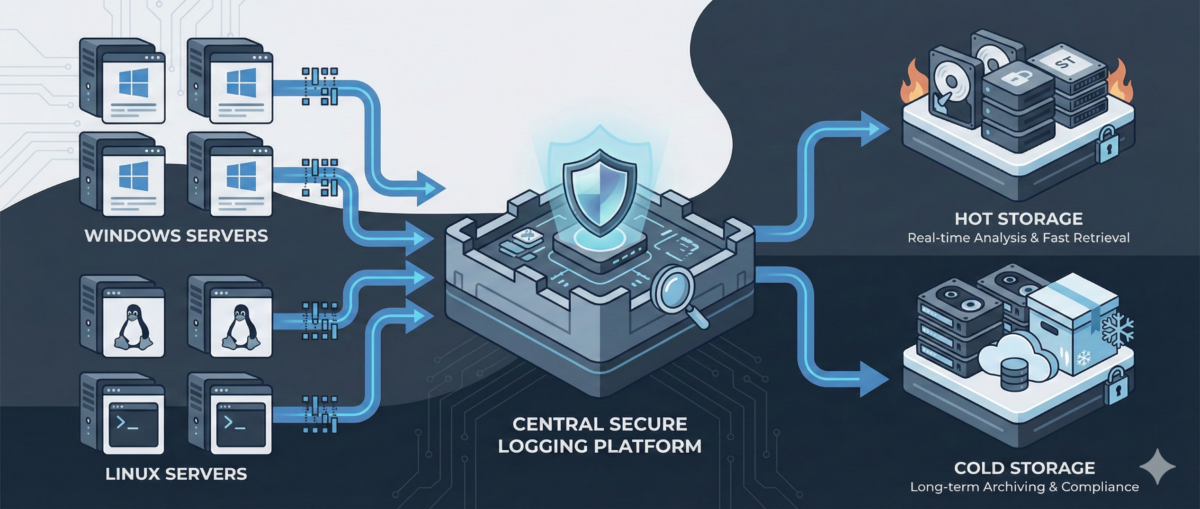
Centralized Logging for Windows and Linux: A Practical Blueprint for IT Ops

Centralized Logging for Windows and Linux: A Practical Blueprint for IT Ops

When something breaks at 02:13 AM, logs are either your best friend—or completely useless.

In mixed environments (Windows + Linux + on-prem + cloud), logs are often:

  • scattered across servers,

  • overwritten too quickly,

  • inaccessible during incidents,

  • or never reviewed until after an outage.

A centralized logging strategy transforms logs from passive files into an operational control system.

This guide outlines how to design a scalable, secure, and useful logging architecture for real-world IT environments.


Why Centralized Logging Is Not Optional Anymore

Incident response speed

Without centralized logs:

  • You SSH/RDP into multiple machines.

  • You manually grep or search Event Viewer.

  • You lose precious time correlating events.

With centralized logging:

  • You search once.

  • You correlate across systems instantly.

  • You reduce Mean Time To Resolution (MTTR).

Security visibility

Modern attacks move laterally.
If logs stay local, detection becomes nearly impossible.

Central logs enable:

  • suspicious login pattern detection

  • privilege escalation tracing

  • anomaly identification across hosts

Compliance and audit

Many standards require:

  • log retention policies

  • tamper-resistant storage

  • traceability of admin actions


Step 1: Define What to Log (Not Everything Is Equal)

Logging everything blindly leads to noise.

Windows (Recommended Sources)

  • Security Event Logs (logon events, privilege use)

  • System logs

  • Application logs

  • PowerShell logs (script block logging)

  • Sysmon (for deeper visibility)

Linux (Recommended Sources)

  • auth.log / secure

  • syslog / journald

  • sudo logs

  • SSH logs

  • application-specific logs (nginx, apache, docker, etc.)

Key Principle

Log based on:

  • security relevance

  • operational value

  • troubleshooting frequency

  • compliance needs


Step 2: Choose an Architecture Model

Option A: Agent-Based Collection

Each server runs a lightweight agent:

  • forwards logs securely

  • buffers during outages

  • supports filtering and parsing

Pros:

  • reliable delivery

  • fine-grained control

Cons:

  • agent lifecycle management required

Option B: Agentless / Pull-Based

Central system pulls logs via:

  • Windows Event Forwarding (WEF)

  • Syslog forwarding

  • API-based integrations

Pros:

  • fewer components per host

Cons:

  • less flexible filtering

  • scaling challenges in large environments

In most real infrastructures, agent-based models scale better.


Step 3: Standardize Log Structure

If Windows logs and Linux logs look completely different, correlation becomes painful.

Normalize Fields

Ensure consistent fields such as:

  • hostname

  • environment (dev/stage/prod)

  • IP address

  • user

  • severity

  • timestamp (UTC strongly recommended)

Add Context

Tag logs with:

  • service name

  • business criticality

  • region

  • patch group or cluster

Context is what turns logs into intelligence.


Step 4: Secure the Logging Pipeline

Logs contain sensitive data:

  • usernames

  • internal IPs

  • command history

  • sometimes secrets (misconfigured apps)

Security Requirements

  • TLS encryption in transit

  • role-based access control

  • separation of admin vs read-only roles

  • immutable or append-only storage

  • log retention policies

Protect Against Log Tampering

Attackers often:

  • delete logs

  • modify local log files

  • disable logging services

Centralized and restricted storage prevents this.


Step 5: Retention and Storage Strategy

Define retention by tier.

Example:

  • Security logs: 180–365 days

  • Operational logs: 30–90 days

  • Debug logs: short-term (7–14 days)

Consider:

  • storage cost vs compliance

  • hot vs cold storage

  • searchable vs archived logs


Step 6: Build Operational Use Cases

Logging is useless without queries and alerts.

Operational Use Cases

  • Service crash detection

  • Repeated restart loops

  • Disk error patterns

  • Failed scheduled tasks

Security Use Cases

  • Multiple failed login attempts

  • Admin group membership changes

  • New service installation

  • Suspicious PowerShell execution

Create dashboards per:

  • infrastructure tier

  • business service

  • security monitoring


Step 7: Avoid Common Logging Mistakes

Logging without monitoring

Collecting logs without alerts or dashboards = expensive storage.

Over-collecting

Too much noise hides real signals.

No ownership

Define:

  • who reviews alerts

  • who maintains parsers

  • who manages retention policies

Logging must be part of operations—not an afterthought.


Conclusion

Centralized logging is not a “SIEM project.”
It is core infrastructure hygiene.

Done correctly, it provides:

  • faster incident response

  • stronger security posture

  • audit readiness

  • operational clarity

Logs are not just records.
They are your infrastructure memory.
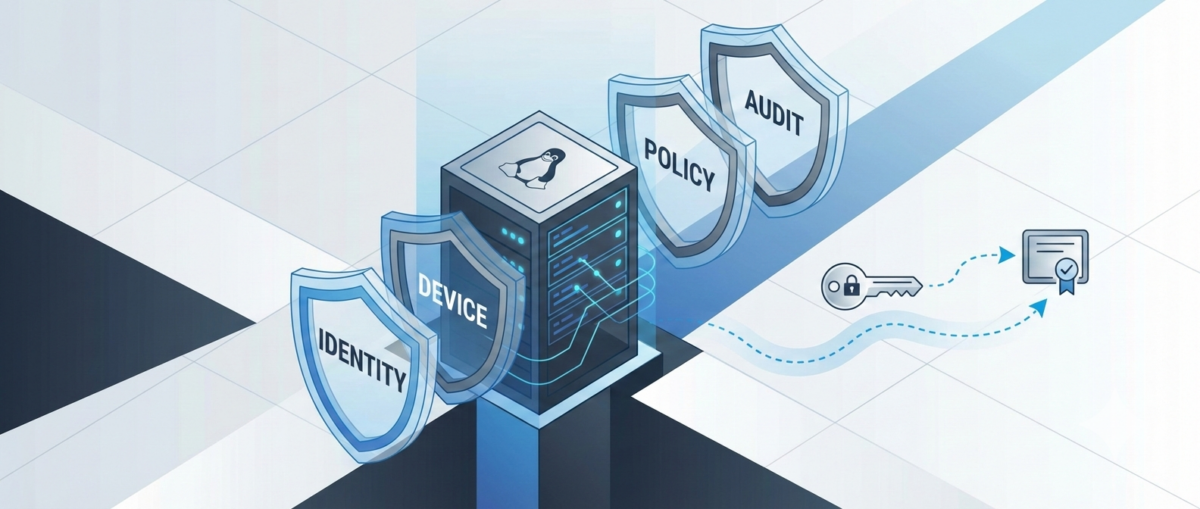
Zero Trust SSH: Hardening Linux Access Without Breaking Operations

Zero Trust SSH: Hardening Linux Access Without Breaking Operations

SSH is still the backbone of Linux operations—incident response, patching, break-glass access, automation, and day-to-day administration. But in many environments, SSH access is treated as a binary switch: either “you can log in” or “you can’t.” That model doesn’t scale in modern organizations where identities change, devices roam, and the blast radius of compromised credentials is massive.

A “Zero Trust” approach to SSH doesn’t mean you stop using SSH. It means you stop trusting networks, long-lived keys, and static access by default—and start validating identity, device posture, intent, and session context every time.

This guide shows a practical hardening path you can roll out incrementally—without crippling your on-call team or breaking automation.


What “Zero Trust” Means for SSH

In practice, Zero Trust SSH is built on four principles:

1) Strong identity over static credentials

Prefer short-lived credentials tied to a real identity and centralized policy.

2) Least privilege by default

Access is constrained to the minimum commands, hosts, time windows, and environments.

3) Continuous verification

Authentication is necessary, but not sufficient—authorization, posture, and session behavior matter too.

4) Auditability and revocability

You should be able to answer: Who accessed what, when, why, from where, using which device—and what did they do? And you should be able to revoke access instantly.


Baseline Hardening in sshd_config (Low-Risk, High-Impact)

Start by making SSH safer without changing workflows.

Disable password auth (or phase it out)

Passwords are phishable and reused.

  • Target state: PasswordAuthentication no

  • Transition: restrict password auth to a bastion or limited group temporarily.

Disallow root SSH login

Require named accounts + privilege escalation.

  • PermitRootLogin no

Reduce attack surface

  • AllowUsers / AllowGroups to explicitly constrain who can log in

  • MaxAuthTries 3

  • LoginGraceTime 30

  • X11Forwarding no (unless truly needed)

  • AllowTcpForwarding no (enable only for specific roles)

  • PermitTunnel no (unless required)

Use modern cryptography

If you maintain older systems, align carefully, but aim for modern KEX/ciphers/MACs and disable legacy algorithms.


Key Management: Stop Treating Keys as Forever Credentials

Traditional SSH keys tend to live for years, get copied between laptops, and are rarely rotated. That’s the opposite of Zero Trust.

Use short-lived SSH certificates (preferred)

Instead of distributing public keys everywhere, you issue SSH certificates that expire (e.g., 8 hours).

  • Central authority signs user keys.

  • Servers trust the CA.

  • Revocation becomes manageable (short TTL + CA policy).

Operational win: You don’t have to chase keys on every server. You control access centrally.

If you must use authorized_keys, lock them down

At minimum:

  • Enforce key rotation (e.g., quarterly)

  • Ban shared keys

  • Ban copying prod keys to personal devices

  • Add from= restrictions when feasible

  • Use separate keys per environment (dev/stage/prod)


Identity-Aware Access: Tie SSH to Your SSO and MFA

SSH should not be the last holdout that bypasses MFA.

Options to achieve MFA + centralized policy

  • Identity-aware proxies / gateways for SSH

  • SSO-integrated access platforms

  • PAM modules and centralized authentication stacks

Goal: When a user leaves the company, access is gone instantly. No lingering keys.


Device Posture: Not All Laptops Are Equal

Zero Trust assumes compromise is possible—so you validate the client, not just the user.

Practical posture checks for SSH access

  • Corporate-managed device requirement for prod

  • Disk encryption enabled

  • EDR running

  • OS patch level within policy

  • MDM compliance state

Even if your SSH stack can’t enforce posture natively, you can enforce it at the access gateway/bastion layer.


Authorization: Don’t Grant Shell When You Only Need a Command

Many operational tasks don’t require full shell access.

Use role-based access patterns

  • Prod read-only role for logs/metrics checks

  • Deployment role limited to CI/CD runners or restricted commands

  • Break-glass role time-bound and heavily audited

Command restriction patterns

  • sudo with tight sudoers rules

  • ForceCommand for narrow workflows

  • Separate service accounts for automation with scoped permissions

Result: even if a credential leaks, the attacker doesn’t get free roam.


Session Controls: Recording, Auditing, and Alerting

Hardening isn’t only about preventing access—it’s also about detecting misuse.

Minimum viable auditability

  • Centralize SSH logs (auth + command where possible)

  • Forward to SIEM

  • Alert on:

    • new source IP / geo anomaly

    • unusual login times

    • first-time access to sensitive hosts

    • repeated failed logins / brute patterns

Session recording (for sensitive environments)

For prod and privileged roles, session recording can be a game-changer—especially in regulated environments.


Automation & CI/CD: Secure SSH Without Breaking Pipelines

Automation is often the reason teams avoid tightening SSH. The key is to treat automation identities properly.

Use distinct machine identities

  • Separate credentials per pipeline / per environment

  • Don’t reuse human keys for automation

Prefer ephemeral credentials for runners

  • Short-lived certs or tokens for CI jobs

  • Rotate secrets automatically

  • Restrict what the runner identity can do (commands/hosts/network)

Add guardrails

  • Only allow automation access from known runner networks

  • Require code review for changes affecting prod access workflows

  • Alert on automation identity used outside pipeline windows


A Rollout Plan That Won’t Cause Pager Fatigue

Phase 1: Baseline hardening (1–2 weeks)

  • Root login off

  • Passwords phased down

  • AllowGroups / allowlists

  • Logging centralized

Phase 2: Centralize identity and MFA (2–6 weeks)

  • SSO integration or gateway

  • Remove shared keys

  • Define roles (read-only / deploy / break-glass)

Phase 3: Ephemeral access + posture (1–3 months)

  • SSH certs with short TTL

  • Device compliance enforcement for prod

  • Session recording for privileged access

Phase 4: Continuous improvement

  • Access reviews

  • Automated key/credential lifecycle

  • Better detections and response playbooks


Common Pitfalls to Avoid

“We’ll just block SSH from the internet”

Good start, but not Zero Trust. Internal networks can be compromised.

“We’ll enforce MFA but keep permanent keys”

MFA helps at login time; permanent keys can still leak and live forever.

“We’ll lock it down later”

SSH is one of the highest-impact attack paths. Hardening is one of the best ROI security projects you can do.


Conclusion

Zero Trust SSH is not one product or one config. It’s a practical shift:

  • from static keys to short-lived credentials,

  • from network trust to identity + device trust,

  • from broad shell access to least privilege,

  • from “hope nothing happens” to auditable, revocable access.

You can start today with baseline sshd hardening and a clear rollout plan—then move to centralized identity, ephemeral access, and posture enforcement without disrupting operations.