Centralized Logging is Essential

Why centralized logging is essential

In modern infrastructure, logs are everywhere:

  • Linux system logs
  • application logs
  • container logs
  • security and audit logs

When logs stay on individual servers, operations become difficult:

  • troubleshooting takes longer
  • incidents lack visibility
  • correlation between systems is nearly impossible
  • logs may be lost during outages

Centralized logging solves this by aggregating logs into a single, searchable system.

What is centralized logging

Centralized logging is the practice of collecting logs from multiple systems and storing them in a unified platform where they can be:

  • searched
  • analyzed
  • visualized
  • alerted on

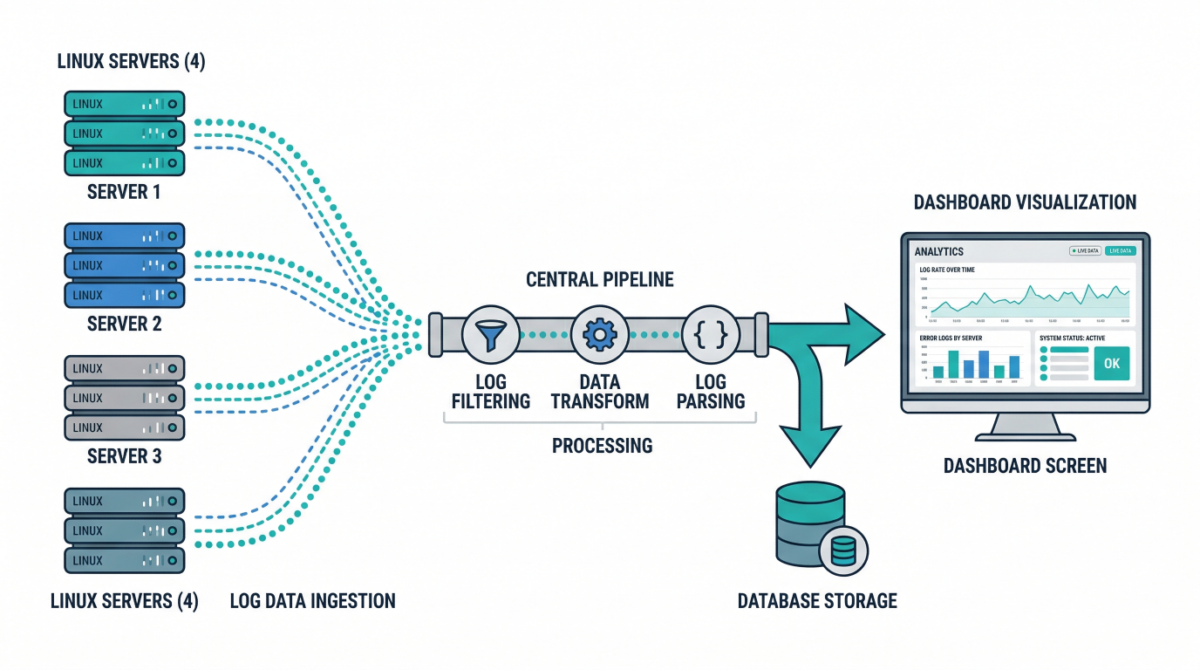
Typical flow:

Server → Log shipper → Processing pipeline → Storage → Visualization

Key components of a log pipeline

Log sources

These include:

  • /var/log/syslog, /var/log/auth.log
  • application logs
  • container stdout/stderr
  • cloud service logs

Log shippers

Agents installed on servers to forward logs:

  • lightweight collectors
  • handle buffering and retries
  • ensure reliable delivery

Processing layer

Logs are parsed, enriched, and transformed:

  • add metadata (hostname, environment)
  • normalize formats
  • filter noise

Storage backend

Central system where logs are stored and indexed for querying.

Visualization and alerting

Dashboards and alerts help teams:

  • monitor systems
  • detect anomalies
  • investigate incidents

Common architecture patterns

Basic logging setup

  • Each server runs a log shipper
  • Logs sent to a central server
  • Stored and queried centrally

Good for small to medium environments.

Scalable pipeline architecture

  • Load-balanced ingestion layer
  • Distributed processing nodes
  • Scalable storage cluster

Designed for high-volume environments.

Cloud-native logging

  • Containers emit logs to stdout
  • Logging agents collect from nodes
  • Logs shipped to centralized services

Ideal for Kubernetes environments.

Designing a reliable logging pipeline

Ensure durability

Logs should not be lost during:

  • network interruptions
  • server failures

Use buffering and retry mechanisms.

Structure your logs

Structured logs (JSON) enable:

  • better search
  • easier parsing
  • improved analytics

Enrich logs with metadata

Add fields like:

  • environment (prod/staging)
  • service name
  • region
  • instance ID

This makes filtering and correlation easier.

Implement retention policies

Not all logs need to be stored forever.

Define:

  • short-term hot storage
  • long-term archival

Security considerations

Protect sensitive data

Avoid logging:

  • passwords
  • tokens
  • personal data

Mask or filter sensitive fields.

Control access

Restrict who can view logs, especially:

  • authentication logs
  • audit logs

Enable audit logging

Track access to logging systems themselves.

Practical use cases

Incident response

Quickly correlate logs across systems to identify root causes.

Security monitoring

Detect suspicious behavior:

  • failed login attempts
  • privilege escalation
  • unusual access patterns

Performance troubleshooting

Analyze latency, errors, and system behavior over time.

Compliance and auditing

Maintain logs for regulatory requirements.

Example: Minimal logging pipeline

  1. Install log shipper on each server
  2. Forward logs to central collector
  3. Parse and enrich logs
  4. Store in searchable backend
  5. Build dashboards and alerts

Even a simple setup significantly improves visibility.

Common mistakes to avoid

Storing logs locally only

Logs disappear if the server is lost.

Ignoring log structure

Unstructured logs are difficult to analyze at scale.

No retention strategy

Leads to high storage costs or missing historical data.

Over-logging

Too much noise reduces signal quality and increases cost.

Conclusion

Centralized logging is a foundational capability for:

  • observability
  • security
  • incident response
  • operational excellence

By building a scalable log pipeline, infrastructure teams gain the visibility needed to operate complex systems with confidence.
Why IT teams should automate repetitive operations

Why IT teams should automate repetitive operations

Modern infrastructure teams spend an enormous amount of time on repetitive operational tasks:

  • Creating user accounts

  • Running routine health checks

  • Sending alerts and reports

  • Triggering scripts across systems

  • Synchronizing data between services

Many of these tasks are simple but frequent, which makes them perfect candidates for automation.

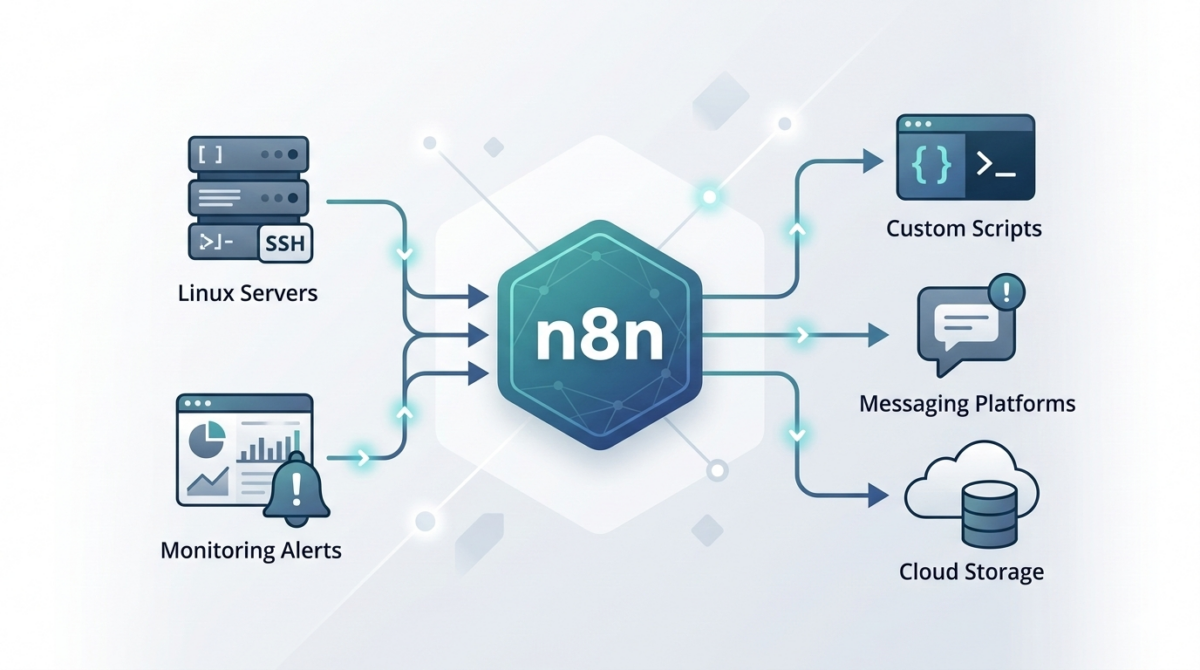
While scripting (Bash, Python, PowerShell) solves part of the problem, orchestration between tools often becomes complex. This is where n8n becomes extremely useful for IT operations teams.

n8n allows you to visually orchestrate automation workflows while still integrating with scripts and APIs.

What is n8n and why it fits IT operations

n8n is an open‑source workflow automation platform designed for connecting systems and automating processes.

Unlike many automation platforms:

  • It can be self-hosted

  • It supports custom code nodes

  • It integrates easily with APIs, scripts, and webhooks

  • It fits well in DevOps and infrastructure environments

For infrastructure teams, this means you can connect:

  • monitoring systems

  • infrastructure scripts

  • messaging platforms

  • ticketing systems

  • CI/CD tools

…all inside a single automation pipeline.

Common infrastructure workflows you can automate with n8n

1. Automated incident notifications

Instead of manually posting alerts to Slack or email, n8n can automatically process monitoring alerts.

Example flow:

  1. Monitoring tool sends webhook

  2. n8n parses the alert

  3. Severity is evaluated

  4. Slack/Teams message is sent

  5. Incident ticket is automatically created

This removes manual triage steps and ensures consistent communication.

2. Scheduled infrastructure health reports

Operations teams often check server health manually.

With n8n you can schedule a workflow that:

  • runs a script via SSH

  • collects system metrics

  • aggregates results

  • sends a daily infrastructure report

Example workflow:

Trigger → SSH Node → Parse Script Output → Send Email / Slack

3. Automatic user onboarding

When a new employee joins, multiple systems must be configured:

  • Linux access

  • Git repository permissions

  • VPN access

  • monitoring dashboards

n8n can orchestrate these tasks:

HR system webhook → n8n workflow → API calls + scripts → notification to IT

The entire onboarding process becomes consistent and traceable.

4. Script orchestration across servers

Many IT teams rely on scripts but lack a centralized orchestrator.

n8n can act as a lightweight control layer:

Trigger → Run script → Parse result → Decide next step → Notify

For example:

Trigger: webhook
Action: run Ansible / Bash script
Result: evaluate output
Next: send Slack success/failure message

5. Automated backups and validation

Backups are critical but verification is often skipped.

n8n can automate backup workflows:

  • Trigger scheduled job

  • Call backup script

  • Validate file integrity

  • Store metadata

  • Send report to ops channel

Example: Simple server check workflow

A basic workflow might look like this:

  1. Cron trigger – runs every hour

  2. SSH node – executes a script on the server

  3. IF node – checks response values

  4. Slack node – sends alert if something is wrong

This type of automation reduces manual monitoring significantly.

Best practices for using n8n in infrastructure environments

Run n8n self-hosted

Self-hosting gives you:

  • data control

  • internal network access

  • better security posture

Most teams run n8n using:

  • Docker

  • Kubernetes

  • VM-based deployment

Use credentials and secrets securely

Avoid storing secrets in plain text inside workflows.

Best practices:

  • environment variables

  • secret managers

  • restricted credential access

Log and monitor workflows

Automation failures should be visible.

Recommended:

  • send workflow failure alerts

  • enable execution logging

  • track automation metrics

Version-control workflows

Store exported workflows in Git so changes are tracked.

This allows:

  • rollback

  • collaboration

  • documentation

Where n8n fits in a DevOps stack

n8n is not a replacement for configuration management tools like:

  • Ansible

  • Terraform

  • Kubernetes operators

Instead, it acts as an automation glue layer between systems.

Typical stack example:

Terraform → infrastructure provisioning
Ansible → configuration management
n8n → operational automation and orchestration

Conclusion

Automation is no longer optional for modern IT teams.

Tools like n8n allow infrastructure engineers to:

  • automate repetitive operations

  • integrate multiple systems

  • reduce manual errors

  • improve operational visibility

By combining scripting skills with workflow orchestration, teams can dramatically increase operational efficiency.

Centralized Logging for Windows and Linux: A Practical Blueprint for IT Ops

Centralized Logging for Windows and Linux: A Practical Blueprint for IT Ops

When something breaks at 02:13 AM, logs are either your best friend—or completely useless.

In mixed environments (Windows + Linux + on-prem + cloud), logs are often:

  • scattered across servers,

  • overwritten too quickly,

  • inaccessible during incidents,

  • or never reviewed until after an outage.

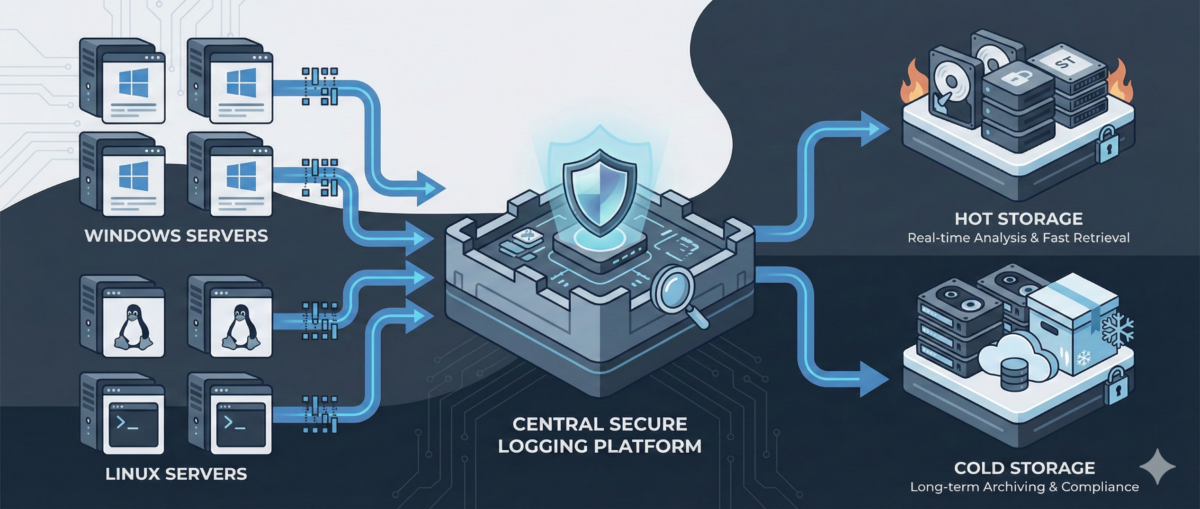
A centralized logging strategy transforms logs from passive files into an operational control system.

This guide outlines how to design a scalable, secure, and useful logging architecture for real-world IT environments.


Why Centralized Logging Is Not Optional Anymore

Incident response speed

Without centralized logs:

  • You SSH/RDP into multiple machines.

  • You manually grep or search Event Viewer.

  • You lose precious time correlating events.

With centralized logging:

  • You search once.

  • You correlate across systems instantly.

  • You reduce Mean Time To Resolution (MTTR).

Security visibility

Modern attacks move laterally.
If logs stay local, detection becomes nearly impossible.

Central logs enable:

  • suspicious login pattern detection

  • privilege escalation tracing

  • anomaly identification across hosts

Compliance and audit

Many standards require:

  • log retention policies

  • tamper-resistant storage

  • traceability of admin actions


Step 1: Define What to Log (Not Everything Is Equal)

Logging everything blindly leads to noise.

Windows (Recommended Sources)

  • Security Event Logs (logon events, privilege use)

  • System logs

  • Application logs

  • PowerShell logs (script block logging)

  • Sysmon (for deeper visibility)

Linux (Recommended Sources)

  • auth.log / secure

  • syslog / journald

  • sudo logs

  • SSH logs

  • application-specific logs (nginx, apache, docker, etc.)

Key Principle

Log based on:

  • security relevance

  • operational value

  • troubleshooting frequency

  • compliance needs


Step 2: Choose an Architecture Model

Option A: Agent-Based Collection

Each server runs a lightweight agent:

  • forwards logs securely

  • buffers during outages

  • supports filtering and parsing

Pros:

  • reliable delivery

  • fine-grained control

Cons:

  • agent lifecycle management required

Option B: Agentless / Pull-Based

Central system pulls logs via:

  • Windows Event Forwarding (WEF)

  • Syslog forwarding

  • API-based integrations

Pros:

  • fewer components per host

Cons:

  • less flexible filtering

  • scaling challenges in large environments

In most real infrastructures, agent-based models scale better.


Step 3: Standardize Log Structure

If Windows logs and Linux logs look completely different, correlation becomes painful.

Normalize Fields

Ensure consistent fields such as:

  • hostname

  • environment (dev/stage/prod)

  • IP address

  • user

  • severity

  • timestamp (UTC strongly recommended)

Add Context

Tag logs with:

  • service name

  • business criticality

  • region

  • patch group or cluster

Context is what turns logs into intelligence.


Step 4: Secure the Logging Pipeline

Logs contain sensitive data:

  • usernames

  • internal IPs

  • command history

  • sometimes secrets (misconfigured apps)

Security Requirements

  • TLS encryption in transit

  • role-based access control

  • separation of admin vs read-only roles

  • immutable or append-only storage

  • log retention policies

Protect Against Log Tampering

Attackers often:

  • delete logs

  • modify local log files

  • disable logging services

Centralized and restricted storage prevents this.


Step 5: Retention and Storage Strategy

Define retention by tier.

Example:

  • Security logs: 180–365 days

  • Operational logs: 30–90 days

  • Debug logs: short-term (7–14 days)

Consider:

  • storage cost vs compliance

  • hot vs cold storage

  • searchable vs archived logs


Step 6: Build Operational Use Cases

Logging is useless without queries and alerts.

Operational Use Cases

  • Service crash detection

  • Repeated restart loops

  • Disk error patterns

  • Failed scheduled tasks

Security Use Cases

  • Multiple failed login attempts

  • Admin group membership changes

  • New service installation

  • Suspicious PowerShell execution

Create dashboards per:

  • infrastructure tier

  • business service

  • security monitoring


Step 7: Avoid Common Logging Mistakes

Logging without monitoring

Collecting logs without alerts or dashboards = expensive storage.

Over-collecting

Too much noise hides real signals.

No ownership

Define:

  • who reviews alerts

  • who maintains parsers

  • who manages retention policies

Logging must be part of operations—not an afterthought.


Conclusion

Centralized logging is not a “SIEM project.”
It is core infrastructure hygiene.

Done correctly, it provides:

  • faster incident response

  • stronger security posture

  • audit readiness

  • operational clarity

Logs are not just records.
They are your infrastructure memory.

Patch Management at Scale: How to Update Windows and Linux Without Breaking Production

Patch Management at Scale: How to Update Windows and Linux Without Breaking Production

Patching is one of the highest ROI security controls—yet it’s also one of the fastest ways to break production if done poorly.

In mixed environments (Windows + Linux + cloud + on‑prem), patching often becomes:

  • a monthly fire drill,

  • a spreadsheet-driven process,

  • or “we’ll do it later” until an incident forces your hand.

This article outlines a practical patch management approach you can roll out in real infrastructure: predictable, auditable, and designed to minimize downtime.


Why Patch Management Fails in Real Ops

Inconsistent inventories

If you can’t answer “what systems exist?”, patching becomes guesswork. Shadow VMs, old endpoints, and forgotten servers create blind spots.

Unclear ownership

“Who owns this server?” is a common patch blocker. Without service ownership, patching stalls.

One-size-fits-all windows

Patching “everything on Sunday night” ignores business criticality and dependencies.

No verification loop

Many teams patch, reboot, and move on—without validating service health, kernel versions, or application behavior.


Patch Management Goals (What “Good” Looks Like)

A mature patch program should deliver:

Predictability

  • Fixed cadence for routine updates

  • Defined emergency process for critical CVEs

Risk-based prioritization

  • Critical internet-facing systems patched first

  • Lower-risk systems batched later

Minimal disruption

  • Rolling updates

  • Maintenance windows aligned to service needs

  • Automated prechecks/postchecks

Evidence and auditability

  • Patch status reporting

  • Change tracking

  • Exception handling with expiry dates


Step 1: Build a Reliable Asset Inventory

What to capture

  • Hostname, IP, OS/version, kernel/build

  • Environment (dev/stage/prod)

  • Criticality tier (1–4)

  • Owner/team and service name

  • Patch group (e.g., “prod-web-rolling”)

Practical sources

  • AD + SCCM/Intune (Windows)

  • CMDB (if accurate)

  • Cloud APIs (AWS/GCP/Azure inventory)

  • Linux tools (e.g., osquery, landscape, spacewalk equivalents)

  • Monitoring/EDR platforms (often best truth source)


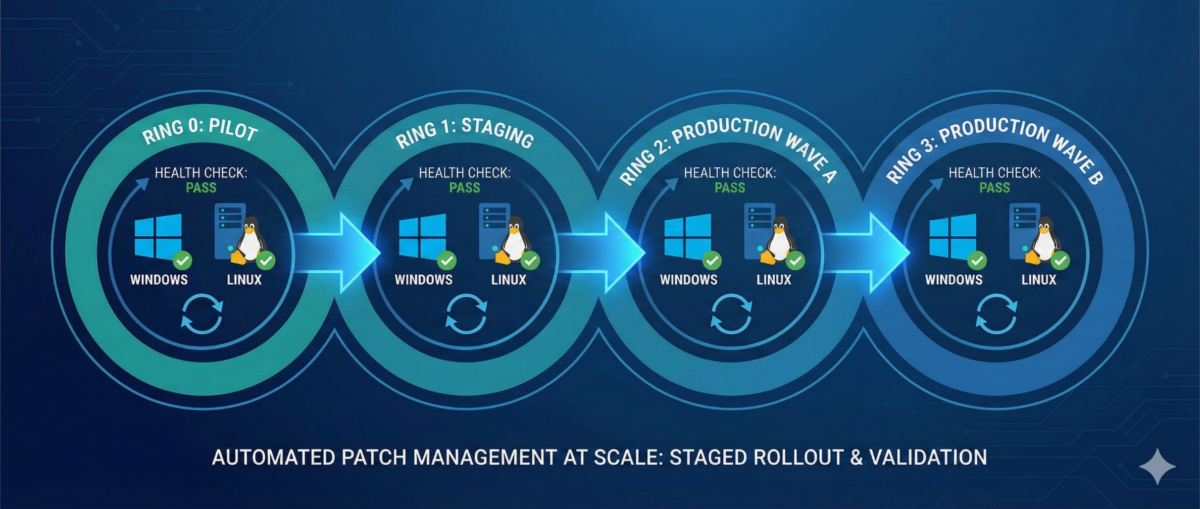
Step 2: Define Patch Rings and Maintenance Policies

Patch rings reduce blast radius.

Example ring model

Ring 0 — Lab/Canary

  • First patch landing zone

  • Includes representative app stacks

Ring 1 — Low-risk production

  • Internal services, non-customer-facing nodes

Ring 2 — Core production

  • Customer-facing workloads with rolling capability

Ring 3 — Critical/Stateful

  • Databases, domain controllers, cluster control planes

  • Heavier change control, deeper validation

Service-based maintenance windows

Instead of one global window:

  • align patching to service usage patterns,

  • and use rolling updates where possible.


Step 3: Standardize on Tooling Per Platform

Windows (common patterns)

  • Intune / WSUS / SCCM / Windows Update for Business

  • GPO for policy enforcement

  • Maintenance windows tied to device groups

Key practices:

  • staged deployments (rings)

  • automatic reboots only in controlled windows

  • reporting for “installed vs pending reboot”

Linux (common patterns)

  • configuration management (Ansible/Salt/Puppet/Chef)

  • distro-native repos + internal mirrors

  • unattended-upgrades (carefully) for low-risk groups

Key practices:

  • pin critical packages if required

  • kernel update strategy (reboot coordination)

  • consistent repo configuration


Step 4: Automate Prechecks and Postchecks

This is where patching becomes safe.

Prechecks (before patching)

  • disk space and inode availability

  • pending package locks / broken deps

  • snapshot/backup status (where applicable)

  • service health baseline (CPU/mem, error rates)

  • cluster state (no degraded nodes)

Postchecks (after patching)

  • OS build / kernel version updated

  • reboot completed and uptime as expected

  • service is healthy (HTTP checks, synthetic tests)

  • logs show no startup failures

  • monitoring confirms normal KPIs


Step 5: Reboot Strategy Without Downtime

Stateless tiers: rolling restarts

  • drain one node at a time

  • patch + reboot

  • verify health

  • re-add to pool

  • proceed to next node

Stateful tiers: controlled approaches

  • leverage replication/failover where possible

  • patch secondaries first

  • promote/demote intentionally

  • schedule longer windows and validate data integrity


Step 6: Handling Critical CVEs (Out-of-Band)

When a critical CVE drops:

  1. Identify affected assets quickly (inventory is everything)

  2. Prioritize internet-facing and high-privilege systems

  3. Patch canary first (short validation)

  4. Roll through rings with accelerated windows

  5. Document exceptions with deadlines


Step 7: Reporting, Exceptions, and Compliance

Metrics worth tracking

  • Patch compliance % by ring and environment

  • Mean time to patch (MTTP) for critical CVEs

  • Reboot compliance

  • of exceptions and time-to-expiry

Exception policy (must-have)

If a system can’t be patched:

  • require risk acceptance approval

  • define compensating controls (WAF, isolation, hardening)

  • set an expiry date (no “forever exceptions”)


Conclusion

Patch management isn’t “install updates.”
It’s a repeatable operational system:

  • inventory → rings → controlled rollout

  • automation → verification → reporting

  • exceptions with deadlines, not excuses

If you run Windows and Linux at scale, patching can be both fast and safe—but only when it’s treated like an engineered process.

Secrets Management in DevOps — From .env Files to Enterprise-Grade Control

Secrets Management in DevOps: From .env Files to Enterprise-Grade Control

API keys. Database passwords. SSH private keys. OAuth tokens.
Secrets are everywhere in modern infrastructure—and they are one of the most common breach vectors.

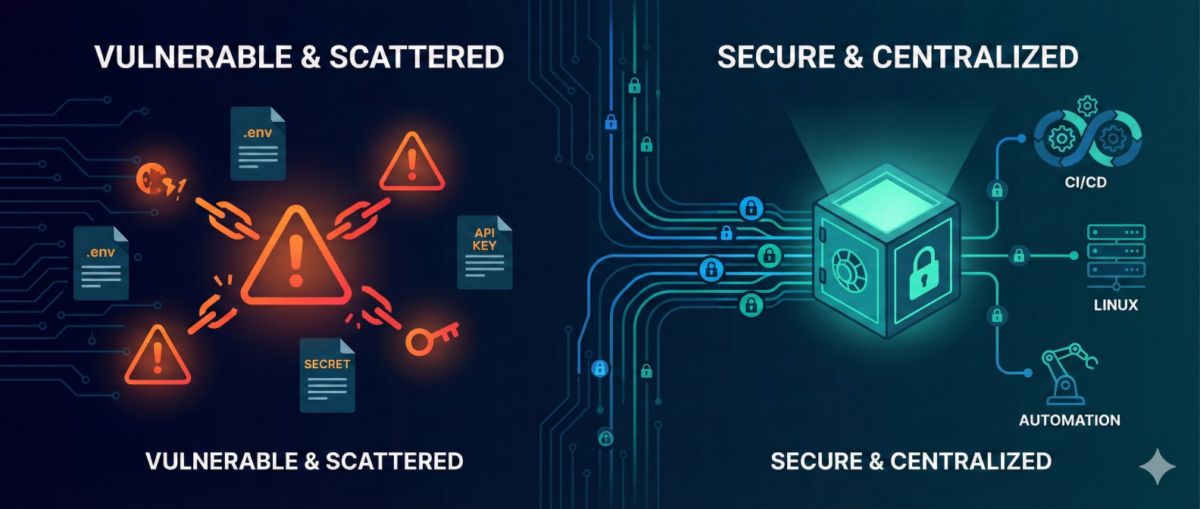
In many environments, secrets still live in:

  • .env files

  • CI/CD variables

  • shared password managers

  • copied Slack messages

  • or worse… Git repositories

As infrastructure scales, this approach becomes dangerous.

This guide explains how to evolve from ad-hoc secret handling to structured, auditable, and secure secrets management—without breaking pipelines or slowing teams down.


Why Secrets Become a Hidden Risk

1) Secrets Spread Faster Than Code

Developers copy:

  • .env files between machines

  • API tokens into scripts

  • credentials into automation workflows

Soon, you lose track of:

  • where secrets are stored

  • who has access

  • which ones are still valid


2) Long-Lived Credentials = Long-Term Risk

Static secrets:

  • rarely rotated

  • shared across environments

  • reused in multiple systems

If leaked once, they remain valid until manually revoked.


3) Automation Amplifies Exposure

CI/CD pipelines, infrastructure-as-code, and workflow tools (like n8n) increase the number of systems that require credentials.

More automation = more secret sprawl if unmanaged.


The Principles of Modern Secrets Management

A mature approach is based on five principles:

1) Centralization

Secrets must live in a centralized secret store, not:

  • Git

  • local files

  • environment variables scattered across hosts

Centralization provides:

  • single control point

  • audit logs

  • policy enforcement


2) Least Privilege Access

Each system or service should only access:

  • the specific secret it needs

  • for the minimum duration required

Not:

  • “full access to all secrets in prod”


3) Short-Lived Credentials

Instead of static credentials:

  • use dynamic, time-limited secrets

  • generate database credentials on demand

  • issue temporary cloud tokens

If compromised, the blast radius is limited.


4) Automatic Rotation

Rotation should be:

  • scheduled

  • automated

  • transparent to applications

Manual rotation does not scale.


5) Full Auditability

You should be able to answer:

  • Who accessed which secret?

  • From which system?

  • At what time?

  • For what purpose?

If you can’t answer this, you have governance gaps.


Practical Architecture for DevOps Teams

You don’t need a massive transformation to improve security.

Phase 1: Remove Secrets from Git

  • Scan repositories for leaked credentials

  • Revoke exposed secrets immediately

  • Replace with environment injection from a secure store

This is the fastest risk reduction step.


Phase 2: Introduce a Central Secret Store

Adopt:

  • Vault-style systems

  • Cloud-native secret managers

  • Encrypted secret backends integrated with CI/CD

All pipelines should fetch secrets at runtime—not store them permanently.


Phase 3: Implement Dynamic Secrets for High-Risk Systems

Especially for:

  • databases

  • cloud IAM roles

  • production SSH access

  • automation service accounts

Dynamic credentials dramatically reduce breach impact.


Phase 4: Secure Automation Platforms (Including n8n)

Automation tools often become secret hubs.

Best practices:

  • store credentials in encrypted backend

  • restrict workflow-level access

  • separate dev/stage/prod secrets

  • audit workflow changes

  • restrict export permissions

Automation must not become a secret leakage vector.


Common Anti-Patterns

“Base64 encoding is enough.”

It is not encryption.


“Only Dev has access, so it’s safe.”

Internal threats and compromised laptops are real risks.


“We rotate once per year.”

In modern threat models, that is effectively static.


Incident Reality: Secrets Leak

When—not if—a secret leaks:

  1. You must detect it quickly.

  2. You must rotate immediately.

  3. You must understand blast radius.

  4. You must audit historical usage.

Without centralized management, this becomes chaos.

With structured secrets management, it becomes a controlled response.


Conclusion

DevOps accelerates delivery—but unmanaged secrets accelerate breaches.

Mature secrets management enables:

  • safer automation

  • reduced blast radius

  • audit-ready infrastructure

  • stronger Zero Trust posture

You don’t need perfection to start.
You need centralization, rotation, and visibility.

From .env files to enterprise-grade control—this is one of the highest ROI security upgrades any infrastructure team can implement.

Zero Trust SSH: Hardening Linux Access Without Breaking Operations

Zero Trust SSH: Hardening Linux Access Without Breaking Operations

SSH is still the backbone of Linux operations—incident response, patching, break-glass access, automation, and day-to-day administration. But in many environments, SSH access is treated as a binary switch: either “you can log in” or “you can’t.” That model doesn’t scale in modern organizations where identities change, devices roam, and the blast radius of compromised credentials is massive.

A “Zero Trust” approach to SSH doesn’t mean you stop using SSH. It means you stop trusting networks, long-lived keys, and static access by default—and start validating identity, device posture, intent, and session context every time.

This guide shows a practical hardening path you can roll out incrementally—without crippling your on-call team or breaking automation.


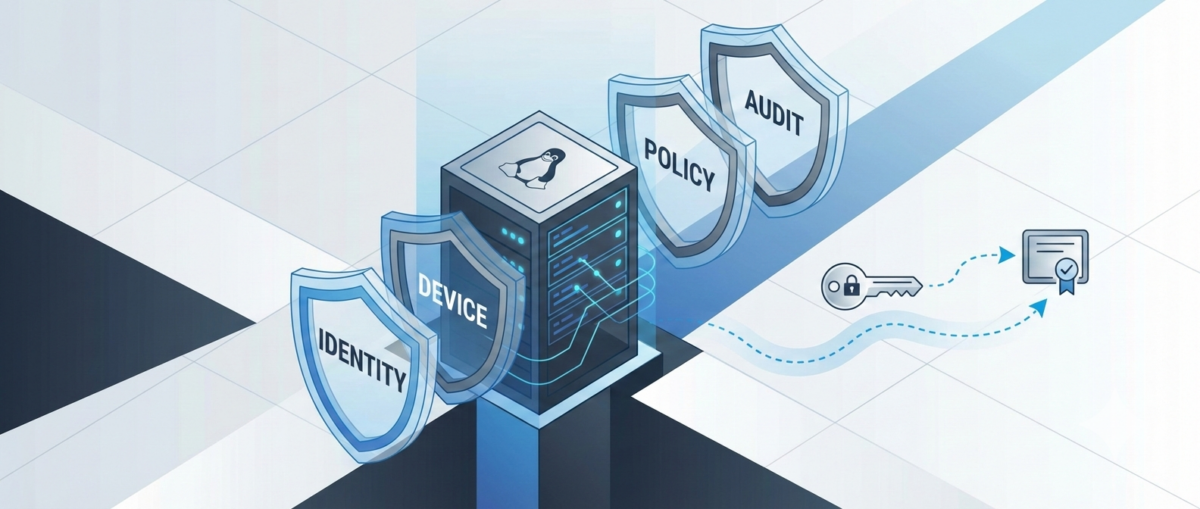
What “Zero Trust” Means for SSH

In practice, Zero Trust SSH is built on four principles:

1) Strong identity over static credentials

Prefer short-lived credentials tied to a real identity and centralized policy.

2) Least privilege by default

Access is constrained to the minimum commands, hosts, time windows, and environments.

3) Continuous verification

Authentication is necessary, but not sufficient—authorization, posture, and session behavior matter too.

4) Auditability and revocability

You should be able to answer: Who accessed what, when, why, from where, using which device—and what did they do? And you should be able to revoke access instantly.


Baseline Hardening in sshd_config (Low-Risk, High-Impact)

Start by making SSH safer without changing workflows.

Disable password auth (or phase it out)

Passwords are phishable and reused.

  • Target state: PasswordAuthentication no

  • Transition: restrict password auth to a bastion or limited group temporarily.

Disallow root SSH login

Require named accounts + privilege escalation.

  • PermitRootLogin no

Reduce attack surface

  • AllowUsers / AllowGroups to explicitly constrain who can log in

  • MaxAuthTries 3

  • LoginGraceTime 30

  • X11Forwarding no (unless truly needed)

  • AllowTcpForwarding no (enable only for specific roles)

  • PermitTunnel no (unless required)

Use modern cryptography

If you maintain older systems, align carefully, but aim for modern KEX/ciphers/MACs and disable legacy algorithms.


Key Management: Stop Treating Keys as Forever Credentials

Traditional SSH keys tend to live for years, get copied between laptops, and are rarely rotated. That’s the opposite of Zero Trust.

Use short-lived SSH certificates (preferred)

Instead of distributing public keys everywhere, you issue SSH certificates that expire (e.g., 8 hours).

  • Central authority signs user keys.

  • Servers trust the CA.

  • Revocation becomes manageable (short TTL + CA policy).

Operational win: You don’t have to chase keys on every server. You control access centrally.

If you must use authorized_keys, lock them down

At minimum:

  • Enforce key rotation (e.g., quarterly)

  • Ban shared keys

  • Ban copying prod keys to personal devices

  • Add from= restrictions when feasible

  • Use separate keys per environment (dev/stage/prod)


Identity-Aware Access: Tie SSH to Your SSO and MFA

SSH should not be the last holdout that bypasses MFA.

Options to achieve MFA + centralized policy

  • Identity-aware proxies / gateways for SSH

  • SSO-integrated access platforms

  • PAM modules and centralized authentication stacks

Goal: When a user leaves the company, access is gone instantly. No lingering keys.


Device Posture: Not All Laptops Are Equal

Zero Trust assumes compromise is possible—so you validate the client, not just the user.

Practical posture checks for SSH access

  • Corporate-managed device requirement for prod

  • Disk encryption enabled

  • EDR running

  • OS patch level within policy

  • MDM compliance state

Even if your SSH stack can’t enforce posture natively, you can enforce it at the access gateway/bastion layer.


Authorization: Don’t Grant Shell When You Only Need a Command

Many operational tasks don’t require full shell access.

Use role-based access patterns

  • Prod read-only role for logs/metrics checks

  • Deployment role limited to CI/CD runners or restricted commands

  • Break-glass role time-bound and heavily audited

Command restriction patterns

  • sudo with tight sudoers rules

  • ForceCommand for narrow workflows

  • Separate service accounts for automation with scoped permissions

Result: even if a credential leaks, the attacker doesn’t get free roam.


Session Controls: Recording, Auditing, and Alerting

Hardening isn’t only about preventing access—it’s also about detecting misuse.

Minimum viable auditability

  • Centralize SSH logs (auth + command where possible)

  • Forward to SIEM

  • Alert on:

    • new source IP / geo anomaly

    • unusual login times

    • first-time access to sensitive hosts

    • repeated failed logins / brute patterns

Session recording (for sensitive environments)

For prod and privileged roles, session recording can be a game-changer—especially in regulated environments.


Automation & CI/CD: Secure SSH Without Breaking Pipelines

Automation is often the reason teams avoid tightening SSH. The key is to treat automation identities properly.

Use distinct machine identities

  • Separate credentials per pipeline / per environment

  • Don’t reuse human keys for automation

Prefer ephemeral credentials for runners

  • Short-lived certs or tokens for CI jobs

  • Rotate secrets automatically

  • Restrict what the runner identity can do (commands/hosts/network)

Add guardrails

  • Only allow automation access from known runner networks

  • Require code review for changes affecting prod access workflows

  • Alert on automation identity used outside pipeline windows


A Rollout Plan That Won’t Cause Pager Fatigue

Phase 1: Baseline hardening (1–2 weeks)

  • Root login off

  • Passwords phased down

  • AllowGroups / allowlists

  • Logging centralized

Phase 2: Centralize identity and MFA (2–6 weeks)

  • SSO integration or gateway

  • Remove shared keys

  • Define roles (read-only / deploy / break-glass)

Phase 3: Ephemeral access + posture (1–3 months)

  • SSH certs with short TTL

  • Device compliance enforcement for prod

  • Session recording for privileged access

Phase 4: Continuous improvement

  • Access reviews

  • Automated key/credential lifecycle

  • Better detections and response playbooks


Common Pitfalls to Avoid

“We’ll just block SSH from the internet”

Good start, but not Zero Trust. Internal networks can be compromised.

“We’ll enforce MFA but keep permanent keys”

MFA helps at login time; permanent keys can still leak and live forever.

“We’ll lock it down later”

SSH is one of the highest-impact attack paths. Hardening is one of the best ROI security projects you can do.


Conclusion

Zero Trust SSH is not one product or one config. It’s a practical shift:

  • from static keys to short-lived credentials,

  • from network trust to identity + device trust,

  • from broad shell access to least privilege,

  • from “hope nothing happens” to auditable, revocable access.

You can start today with baseline sshd hardening and a clear rollout plan—then move to centralized identity, ephemeral access, and posture enforcement without disrupting operations.