
Why IT teams should automate repetitive operations

Why IT teams should automate repetitive operations

Modern infrastructure teams spend an enormous amount of time on repetitive operational tasks:

  • Creating user accounts

  • Running routine health checks

  • Sending alerts and reports

  • Triggering scripts across systems

  • Synchronizing data between services

Many of these tasks are simple but frequent, which makes them perfect candidates for automation.

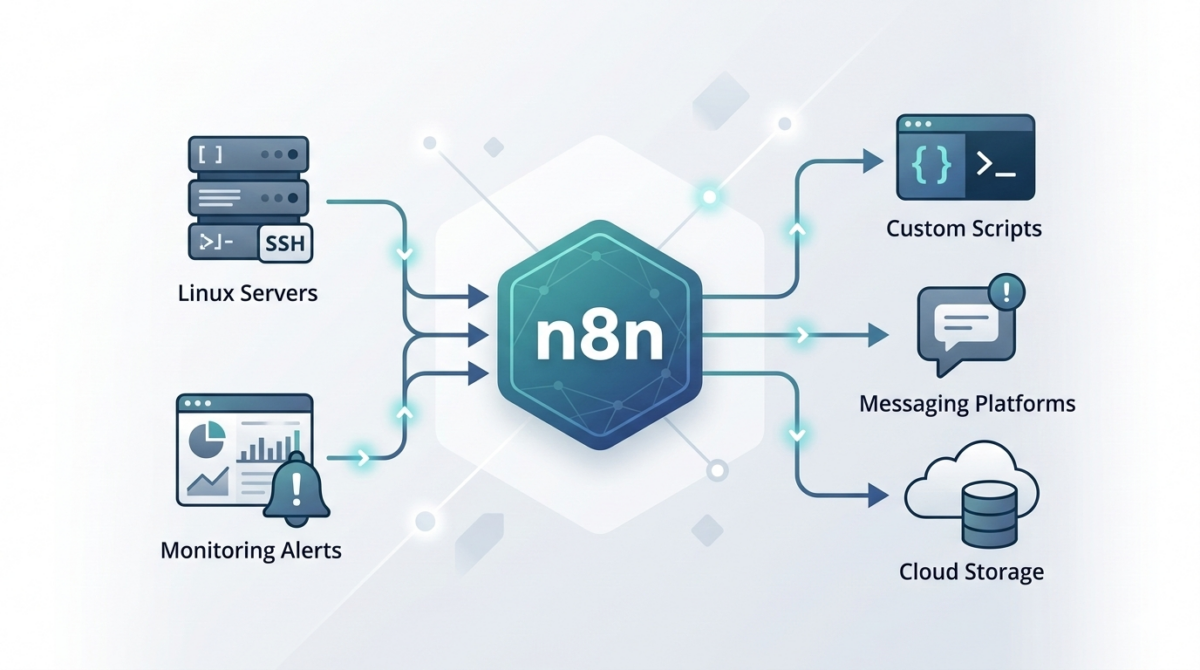
While scripting (Bash, Python, PowerShell) solves part of the problem, orchestration between tools often becomes complex. This is where n8n becomes extremely useful for IT operations teams.

n8n allows you to visually orchestrate automation workflows while still integrating with scripts and APIs.

What is n8n and why it fits IT operations

n8n is an open‑source workflow automation platform designed for connecting systems and automating processes.

Unlike many automation platforms:

  • It can be self-hosted

  • It supports custom code nodes

  • It integrates easily with APIs, scripts, and webhooks

  • It fits well in DevOps and infrastructure environments

For infrastructure teams, this means you can connect:

  • monitoring systems

  • infrastructure scripts

  • messaging platforms

  • ticketing systems

  • CI/CD tools

…all inside a single automation pipeline.

Common infrastructure workflows you can automate with n8n

1. Automated incident notifications

Instead of manually posting alerts to Slack or email, n8n can automatically process monitoring alerts.

Example flow:

  1. Monitoring tool sends webhook

  2. n8n parses the alert

  3. Severity is evaluated

  4. Slack/Teams message is sent

  5. Incident ticket is automatically created

This removes manual triage steps and ensures consistent communication.

2. Scheduled infrastructure health reports

Operations teams often check server health manually.

With n8n you can schedule a workflow that:

  • runs a script via SSH

  • collects system metrics

  • aggregates results

  • sends a daily infrastructure report

Example workflow:

Trigger → SSH Node → Parse Script Output → Send Email / Slack

3. Automatic user onboarding

When a new employee joins, multiple systems must be configured:

  • Linux access

  • Git repository permissions

  • VPN access

  • monitoring dashboards

n8n can orchestrate these tasks:

HR system webhook → n8n workflow → API calls + scripts → notification to IT

The entire onboarding process becomes consistent and traceable.

4. Script orchestration across servers

Many IT teams rely on scripts but lack a centralized orchestrator.

n8n can act as a lightweight control layer:

Trigger → Run script → Parse result → Decide next step → Notify

For example:

Trigger: webhook
Action: run Ansible / Bash script
Result: evaluate output
Next: send Slack success/failure message

5. Automated backups and validation

Backups are critical but verification is often skipped.

n8n can automate backup workflows:

  • Trigger scheduled job

  • Call backup script

  • Validate file integrity

  • Store metadata

  • Send report to ops channel

Example: Simple server check workflow

A basic workflow might look like this:

  1. Cron trigger – runs every hour

  2. SSH node – executes a script on the server

  3. IF node – checks response values

  4. Slack node – sends alert if something is wrong

This type of automation reduces manual monitoring significantly.

Best practices for using n8n in infrastructure environments

Run n8n self-hosted

Self-hosting gives you:

  • data control

  • internal network access

  • better security posture

Most teams run n8n using:

  • Docker

  • Kubernetes

  • VM-based deployment

Use credentials and secrets securely

Avoid storing secrets in plain text inside workflows.

Best practices:

  • environment variables

  • secret managers

  • restricted credential access

Log and monitor workflows

Automation failures should be visible.

Recommended:

  • send workflow failure alerts

  • enable execution logging

  • track automation metrics

Version-control workflows

Store exported workflows in Git so changes are tracked.

This allows:

  • rollback

  • collaboration

  • documentation

Where n8n fits in a DevOps stack

n8n is not a replacement for configuration management tools like:

  • Ansible

  • Terraform

  • Kubernetes operators

Instead, it acts as an automation glue layer between systems.

Typical stack example:

Terraform → infrastructure provisioning
Ansible → configuration management
n8n → operational automation and orchestration

Conclusion

Automation is no longer optional for modern IT teams.

Tools like n8n allow infrastructure engineers to:

  • automate repetitive operations

  • integrate multiple systems

  • reduce manual errors

  • improve operational visibility

By combining scripting skills with workflow orchestration, teams can dramatically increase operational efficiency.
Secrets Management in DevOps — From .env Files to Enterprise-Grade Control

Secrets Management in DevOps: From .env Files to Enterprise-Grade Control

API keys. Database passwords. SSH private keys. OAuth tokens.
Secrets are everywhere in modern infrastructure—and they are one of the most common breach vectors.

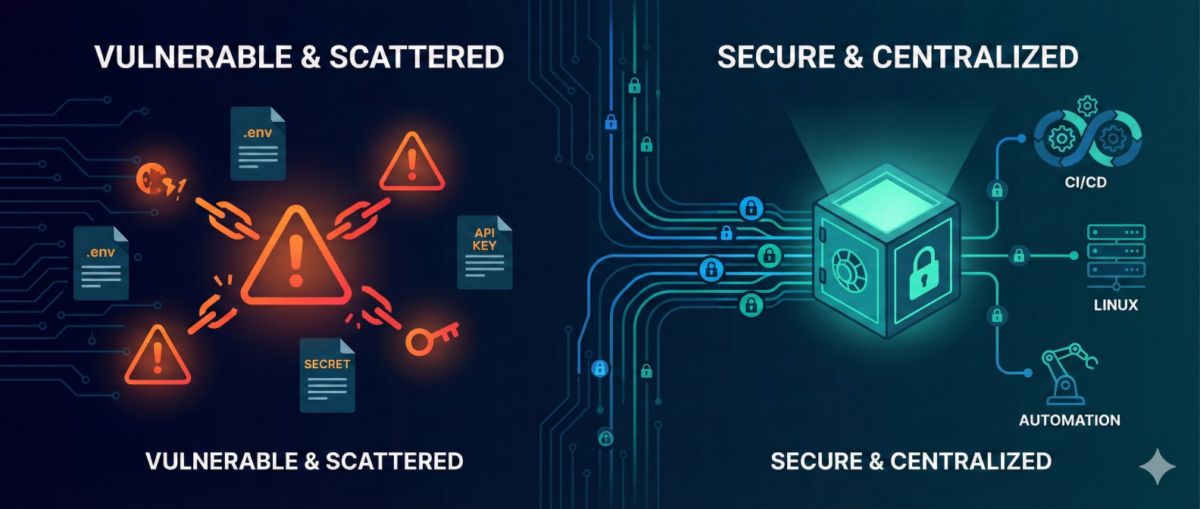
In many environments, secrets still live in:

  • .env files

  • CI/CD variables

  • shared password managers

  • copied Slack messages

  • or worse… Git repositories

As infrastructure scales, this approach becomes dangerous.

This guide explains how to evolve from ad-hoc secret handling to structured, auditable, and secure secrets management—without breaking pipelines or slowing teams down.


Why Secrets Become a Hidden Risk

1) Secrets Spread Faster Than Code

Developers copy:

  • .env files between machines

  • API tokens into scripts

  • credentials into automation workflows

Soon, you lose track of:

  • where secrets are stored

  • who has access

  • which ones are still valid


2) Long-Lived Credentials = Long-Term Risk

Static secrets:

  • rarely rotated

  • shared across environments

  • reused in multiple systems

If leaked once, they remain valid until manually revoked.


3) Automation Amplifies Exposure

CI/CD pipelines, infrastructure-as-code, and workflow tools (like n8n) increase the number of systems that require credentials.

More automation = more secret sprawl if unmanaged.


The Principles of Modern Secrets Management

A mature approach is based on five principles:

1) Centralization

Secrets must live in a centralized secret store, not:

  • Git

  • local files

  • environment variables scattered across hosts

Centralization provides:

  • single control point

  • audit logs

  • policy enforcement


2) Least Privilege Access

Each system or service should only access:

  • the specific secret it needs

  • for the minimum duration required

Not:

  • “full access to all secrets in prod”


3) Short-Lived Credentials

Instead of static credentials:

  • use dynamic, time-limited secrets

  • generate database credentials on demand

  • issue temporary cloud tokens

If compromised, the blast radius is limited.


4) Automatic Rotation

Rotation should be:

  • scheduled

  • automated

  • transparent to applications

Manual rotation does not scale.


5) Full Auditability

You should be able to answer:

  • Who accessed which secret?

  • From which system?

  • At what time?

  • For what purpose?

If you can’t answer this, you have governance gaps.


Practical Architecture for DevOps Teams

You don’t need a massive transformation to improve security.

Phase 1: Remove Secrets from Git

  • Scan repositories for leaked credentials

  • Revoke exposed secrets immediately

  • Replace with environment injection from a secure store

This is the fastest risk reduction step.


Phase 2: Introduce a Central Secret Store

Adopt:

  • Vault-style systems

  • Cloud-native secret managers

  • Encrypted secret backends integrated with CI/CD

All pipelines should fetch secrets at runtime—not store them permanently.


Phase 3: Implement Dynamic Secrets for High-Risk Systems

Especially for:

  • databases

  • cloud IAM roles

  • production SSH access

  • automation service accounts

Dynamic credentials dramatically reduce breach impact.


Phase 4: Secure Automation Platforms (Including n8n)

Automation tools often become secret hubs.

Best practices:

  • store credentials in encrypted backend

  • restrict workflow-level access

  • separate dev/stage/prod secrets

  • audit workflow changes

  • restrict export permissions

Automation must not become a secret leakage vector.


Common Anti-Patterns

“Base64 encoding is enough.”

It is not encryption.


“Only Dev has access, so it’s safe.”

Internal threats and compromised laptops are real risks.


“We rotate once per year.”

In modern threat models, that is effectively static.


Incident Reality: Secrets Leak

When—not if—a secret leaks:

  1. You must detect it quickly.

  2. You must rotate immediately.

  3. You must understand blast radius.

  4. You must audit historical usage.

Without centralized management, this becomes chaos.

With structured secrets management, it becomes a controlled response.


Conclusion

DevOps accelerates delivery—but unmanaged secrets accelerate breaches.

Mature secrets management enables:

  • safer automation

  • reduced blast radius

  • audit-ready infrastructure

  • stronger Zero Trust posture

You don’t need perfection to start.
You need centralization, rotation, and visibility.

From .env files to enterprise-grade control—this is one of the highest ROI security upgrades any infrastructure team can implement.

GitOps for Infrastructure Teams: From Manual Changes to Declarative Control

GitOps for Infrastructure Teams: From Manual Changes to Declarative Control

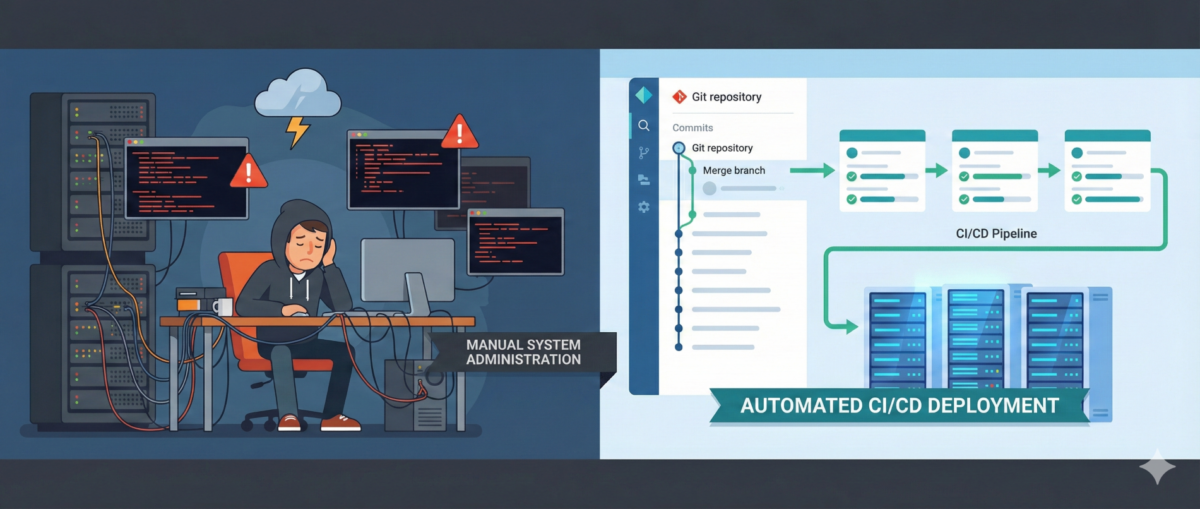
Infrastructure teams are under constant pressure: faster deployments, tighter security, more environments, more automation. Yet in many organizations, infrastructure changes still happen through SSH sessions, manual edits, and undocumented tweaks.

This is where GitOps changes the game.

GitOps is not just for Kubernetes-native startups. It is a powerful operating model for infrastructure, security baselines, configuration management, and even automation workflows.

This article explains how infrastructure teams can adopt GitOps pragmatically—without disrupting operations.


What Is GitOps (Beyond the Buzzword)?

At its core, GitOps means:

  • Git is the single source of truth

  • Desired system state is declared in code

  • Changes happen via pull requests

  • Automation reconciles actual state to desired state

  • Drift is detected and corrected automatically

It replaces:

  • “I logged into the server and changed it”
    with:

  • “I submitted a PR that changed the declared state”


Why Infrastructure Teams Struggle Without GitOps

1) Configuration Drift

Two servers built from the same template end up different over time.

Manual fixes, hot patches, and undocumented changes create invisible risk.

2) No Change Traceability

When an incident happens:

  • Who changed the firewall rule?

  • When was that service modified?

  • Why was that port opened?

Without Git history, answers are guesswork.

3) Security Blind Spots

Manual changes often bypass:

  • peer review

  • policy checks

  • security scanning

This creates compliance and audit risks.


Core Components of GitOps for Infra

You don’t need to start with Kubernetes to do GitOps.

1) Infrastructure as Code (IaC)

Use declarative tools like:

  • Terraform

  • Ansible (declarative mode)

  • Pulumi

  • CloudFormation

Infrastructure becomes version-controlled code.


2) Pull Request Workflow

Every change:

  • goes through PR

  • is reviewed

  • is validated automatically

  • is merged only if compliant

This adds:

  • accountability

  • collaboration

  • rollback capability


3) Automated Reconciliation

Automation ensures the real environment matches Git.

Examples:

  • CI/CD pipelines apply Terraform

  • Scheduled drift detection jobs

  • Controllers continuously reconciling state

No more silent drift.


GitOps in Real Infrastructure Scenarios

Scenario 1: Firewall Changes

Old way:

  • SSH into firewall

  • Add rule

  • Forget to document it

GitOps way:

  • Modify firewall rule in code

  • PR reviewed

  • Automated validation checks policy

  • Change applied through pipeline

  • Audit trail preserved


Scenario 2: Linux Server Baseline Hardening

Instead of manually:

  • disabling services

  • editing sysctl

  • adjusting SSH configs

Define:

  • baseline role in Ansible

  • security profile in code

  • versioned config

Drift detection alerts if someone changes settings manually.


Scenario 3: n8n Workflow Deployment

Even automation platforms benefit from GitOps.

Instead of:

  • editing workflows directly in UI

You:

  • export workflows as JSON

  • store in Git

  • review changes

  • deploy via pipeline

Now automation itself is controlled and auditable.


The Security Benefits of GitOps

1) Least Privilege Enforcement

Direct production access can be reduced:

  • Engineers don’t need SSH for routine changes.

  • Pipelines execute approved changes.

2) Audit-Ready by Design

Git history becomes:

  • change log

  • approval record

  • rollback mechanism

3) Faster Incident Recovery

Rollback = revert commit + pipeline run.

No guessing what “used to work.”


A Practical Adoption Roadmap

Phase 1: Version Everything

  • Move infra configs to Git

  • Protect main branch

  • Enforce PR reviews

No automation changes yet—just discipline.


Phase 2: Add Automated Validation

  • Linting

  • Policy-as-code checks

  • Security scanning

  • Plan previews (e.g., Terraform plan in PR)


Phase 3: Restrict Manual Production Changes

  • Limit direct SSH

  • Require pipeline for infra updates

  • Monitor drift


Phase 4: Continuous Reconciliation

  • Scheduled drift detection

  • Automated correction (where safe)

  • Alerting on unauthorized changes


Common Mistakes

“GitOps means no humans touch prod.”

Not realistic. Break-glass access must exist—but logged and controlled.


“We need Kubernetes first.”

False. GitOps is an operational model, not a platform requirement.


“It slows us down.”

Initially, yes.
Long term: fewer outages, faster rollbacks, stronger security.


Conclusion

GitOps is not about tools.
It’s about control, visibility, and repeatability.

For infrastructure teams, it means:

  • fewer midnight surprises

  • better audit posture

  • safer automation

  • and less reliance on fragile tribal knowledge

Manual changes scale chaos.
Declarative control scales stability.